
Shopify Hydrogen 2026-10: Commerce Without Replatforming
A business no longer has to replace its entire JavaScript website to use Shopify's headless commerce building blocks. On 14 October 2026, Shopify made Hydrogen 2026-10 generally available as a framework-agnostic library. It can now sit inside a server-capable JavaScript application while the existing framework keeps control of routing, rendering, data loading and design.
That is a meaningful architectural change. The earlier Hydrogen model was a framework based on React Router. The new model can be added to an existing Astro, Next.js, Nuxt, SvelteKit, SolidStart or other server-rendered JavaScript project. Hydrogen supplies Shopify-aware commerce capabilities such as cart state, product variants, Markets, predictive search, Shop Pay, customer accounts and consent-aware analytics.
For Australian businesses, the commercial question is not simply whether Hydrogen is new. It is whether the new library reduces the cost and risk of adding commerce to a valuable existing website. This guide explains when that case is strong, what your team still owns, and how to test a new build or migration before revenue depends on it.
Why Hydrogen 2026-10 Is Trending Now
The release is timely for two reasons. First, Shopify moved the redesigned Hydrogen from developer preview to general availability after seven releases shaped by developer feedback. Second, it changes the replatforming decision. A team can now add Shopify commerce to an application it already operates instead of beginning with a Shopify-specific front-end framework.
The new getting-started guidance offers two clear paths: deploy a React Router or Next.js starter, or add Hydrogen to an existing server-capable JavaScript project. Shopify explicitly lists Astro, Nuxt, SvelteKit and SolidStart as examples for the second path.
This is not a universal shortcut. A static-only website cannot run the server request handlers Hydrogen needs, and a business still owns the storefront experience, integration design, privacy decisions, testing, release process and support model. General availability makes the option credible for production planning; it does not remove engineering responsibility.
Three numbers that explain the timing
Hydrogen 2026-10 became generally available on 14 October 2026.
14 Oct
Shopify shipped seven developer-preview releases before general availability.
7 releases
Version-matched coding-agent skills cover the main storefront capabilities.
20 skills
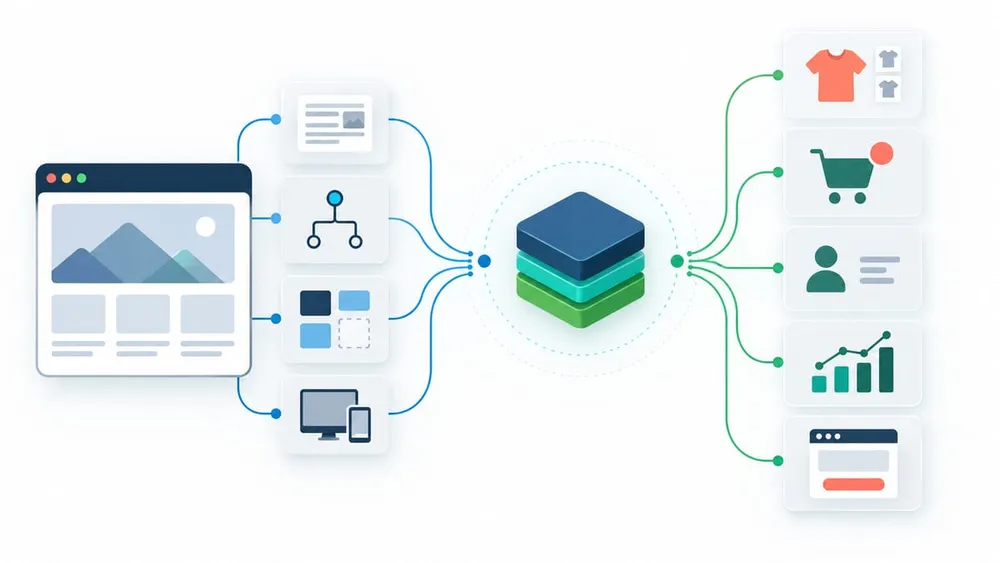
Keep the valuable layers and replace only what must change
What Actually Changed in Hydrogen
Hydrogen used to own the incoming request, create Shopify clients in a server entry and provide the development and build commands. In 2026-10, your application owns the server entry, router and build. Hydrogen supplies composable parts that run around that router.
The official migration guide describes the new request sequence:
- Create a Shopify request context using the incoming request, buyer IP and market settings.
- Create the Storefront API client for that request.
- Run
handleShopifyRoutes()so Shopify-owned paths such as cart, checkout and account actions can respond before the application router. - Pass the typed storefront client to application loaders or server functions.
- If the application returns a 404, run
handleShopifyRedirects()to check Shopify-managed redirects.
This separation is the key benefit. The application stays recognisably yours, while Shopify-specific behaviour is concentrated in documented handlers and stores. It can reduce custom glue code, but the boundaries must be explicit because a route collision or missing middleware can break commerce while the site still builds successfully.
When Adding Hydrogen to an Existing Site Makes Sense
The new library is most attractive when the current website has real value that should survive the commerce project. That value might be a mature CMS, a custom application, a strong design system, high-performing content templates, established SEO, authenticated business tools or integrations that would be expensive to recreate.
Consider an incremental Hydrogen project when:
- the existing site already uses a server-capable JavaScript framework;
- Shopify should own products, carts, customer accounts and checkout, but not every page;
- content, services and commerce need to share one navigation and brand experience;
- the business wants a staged rollout rather than a big-bang replatform;
- the team needs a custom storefront experience beyond a conventional theme;
- the organisation has engineering ownership for testing, deployment and support.
A professional-services company adding a product catalogue, a publisher selling subscriptions or merchandise, or a custom portal adding a transaction flow can all fit this pattern. The decision should follow a short technical discovery, not a demo alone.
Four sensible Shopify storefront paths
Hydrogen expands the options. It does not make every alternative obsolete.
Keep a Shopify theme
Best when standard merchandising, apps and checkout meet the business need. It usually has lower ownership cost than a custom headless storefront.
Add Hydrogen incrementally
Best when an existing server-rendered JavaScript site is valuable and Shopify commerce should become one capability inside it.
Start from a Hydrogen template
Best for a new custom storefront where React Router or Next.js is a good fit and the team wants working commerce routes quickly.
Build another headless integration
Best when non-JavaScript architecture, existing commerce middleware or unusual platform constraints make Hydrogen a poor fit.
What Your Team Still Owns
Hydrogen handles difficult commerce plumbing, but it is not a hosted page builder or complete design system. Shopify's documentation is clear that the application builds its own storefront UI. Your delivery team still owns:
- information architecture, routes, templates and content integration;
- accessible product, collection, search, cart and account interfaces;
- SEO metadata, canonical URLs, structured data, redirects and sitemaps;
- application security, environment variables, session storage and secret management;
- privacy notices, cookie choices and third-party analytics behaviour;
- integration with CMS, CRM, ERP, fulfilment, search and marketing platforms;
- performance budgets, caching rules, monitoring, incident response and support;
- testing for Australian currencies, GST presentation, delivery regions and business policies.
This ownership is why headless commerce should be justified by business requirements. The benefit is control and composability. The cost is that the business needs a product-quality engineering and maintenance practice around the storefront.
Existing Hydrogen Stores Need a Migration Project
Shopify says existing Hydrogen storefronts keep working, so there is no same-day shutdown. However, moving from 2026-04 or earlier is not a routine dependency bump. The migration changes who owns the request, the commands used for development and builds, and the APIs used by major storefront features.
Plan the migration as separate workstreams:
- Inventory the current stack. Record the Hydrogen, Remix or React Router, React, Vite, CLI and Oxygen packages, plus custom server middleware and route ownership.
- Stabilise dependencies. Use Shopify's tested version set instead of independently upgrading every major package at once.
- Move request handling. Add the root middleware, Storefront API client, Shopify route handlers and redirect handling.
- Migrate commerce state. Replace the old cart context and route with the new server handlers and client-side cart store.
- Migrate customer accounts. Rebuild sessions around the Customer Account API handlers and test HTTPS callbacks.
- Rebuild analytics deliberately. Port every page, product, collection, search and cart event; do not settle for page views alone.
- Replace removed helpers. Own image, money and pagination components, plus sitemap queries and URL behaviour.
- Rehearse the cutover. Compare a production-shaped environment with the current storefront and retain a documented rollback route.
Use a Revenue-Focused Test Matrix
A green build is necessary but not sufficient. Shopify's production checklist warns that a site can compile while the cart API returns a 404 because request handlers are miswired. Test the development server and the production bundle.
Commerce journeys
- product availability, variants, sold-out states and market-specific prices;
- rapid add-to-cart clicks, quantity changes, discount codes and error recovery;
- cart persistence across navigation, login and checkout hand-off;
- Shop Pay visibility, checkout completion and order creation;
- customer login, logout, token refresh, order history and shared-device behaviour.
Website quality
- server-rendered titles, prices and product content;
- canonical URLs, redirects, sitemap entries and structured data;
- keyboard navigation, focus movement, accessible names and no-JavaScript cart fallback;
- Core Web Vitals, image behaviour, caching and production-host runtime differences;
- analytics events, consent choices, attribution and downstream destinations.
Define an owner and expected result for every scenario. Failed checks should block release when they affect revenue, identity, privacy, accessibility or reporting integrity.
Analytics and Consent Need an Australian Review
Hydrogen 2026-10 uses ShopifyScripts and a browser event bus. The bus can hold events until the visitor's privacy choice permits delivery, then send them to Shopify analytics and approved custom destinations. This is useful infrastructure, but it does not outsource the business's privacy decisions.
The OAIC's analytics guidance highlights notice and consent, collection and retention minimisation, and limits on use as practical privacy considerations. For a Hydrogen project, document:
- which events are collected and why;
- which destinations receive each event;
- whether customer or account identifiers are included;
- how regional consent modes behave;
- how a visitor changes or withdraws a choice;
- which separately loaded scripts sit outside Hydrogen's consent gate;
- how long analytics and customer data are retained.
Test both consent and refusal. A technically working event stream that ignores the visitor's choice is not a successful implementation. This section is general implementation guidance, not legal advice.
Protect Customer Identity and Buyer Context
Hydrogen provides account handlers for login, authorisation, token refresh and logout, but the application owns session storage and the account interface. The customer-account documentation recommends keeping tokens in protected server storage or an HttpOnly cookie, never browser storage or client components.
Hosting configuration also matters. A request-scoped private Storefront API client can forward buyer context, including the buyer's IP address. Hydrogen does not guess which header is trustworthy; the application must read the header set by its hosting provider and prevent customers from spoofing it. Oxygen, Cloudflare, Vercel and Fly.io use different header conventions.
Include session fixation, logout on shared devices, expired tokens, rejected refreshes, callback validation, cookie security, secret rotation and least-privilege environment access in the threat model. Customer identity is a business-critical boundary, not just another UI feature.
Choose Hosting by Operational Fit
Hydrogen can run wherever the application runs. The React Router starter can deploy to Oxygen, Shopify's Worker-based hosting platform, while the Next.js starter targets Vercel. An existing application can retain another compatible host.
Compare hosting choices across more than subscription price:
- runtime compatibility with the existing application and dependencies;
- regional performance, cache control and preview environments;
- deployment approvals, rollback speed and environment management;
- logs, traces, error reporting and synthetic journey monitoring;
- secret storage, trusted proxy headers and incident access;
- team skills, support arrangements and vendor concentration.
If Oxygen is selected, test the production Worker bundle rather than relying only on local development. If another host is selected, verify buyer-IP handling, server runtime behaviour and all Shopify request routes in that environment. VaniTech's cloud architecture services can help evaluate the whole operating model rather than treating hosting as a last-minute deployment detail.
A Practical 30-Day Evaluation Plan
Week 1: Decide whether the problem is architectural
Map the current website, CMS, commerce data, integrations, design system, SEO assets and operational owners. Compare a theme, an incremental Hydrogen integration, a starter-based rebuild and another headless approach. Write measurable reasons for choosing custom storefront work.
Week 2: Prove the thin commerce slice
In a non-production store, connect product data and build one server-rendered product journey through variant selection, cart and Shopify checkout. Add a real market and currency. Confirm request handlers, cookies and redirects in the intended host.
Week 3: Add the risk-bearing features
Implement customer accounts, consent-aware analytics, error states, SEO metadata and accessibility. Connect only the integrations required for the pilot. Run privacy and security review before adding more destinations or customer data.
Week 4: Test the production shape
Build and run the production bundle. Execute the revenue, identity, privacy, accessibility, performance and monitoring matrix. Estimate ongoing support effort, record rollback steps and present a proceed, revise or stop decision with evidence.
The result should be a business decision, not merely a prototype. If the pilot cannot demonstrate lower replatforming risk, acceptable performance and supportable ownership, stay with the simpler storefront path.
Questions Australian teams are asking
Final Recommendation
Hydrogen 2026-10 is most valuable when Shopify commerce should become part of a website that is already worth keeping. It reduces the need for a framework-level replatform, offers supported commerce building blocks and preserves the team's control over experience and hosting.
Use that flexibility carefully. Start with the architecture decision, not the installation command. Prove one complete revenue journey, then validate identity, consent, SEO, accessibility, performance and operations in the production shape. Existing Hydrogen teams should treat the move as a migration project rather than a package update.
For related planning, review VaniTech's guides to payment gateways for headless commerce and the Shopify 2026-10 API integration changes.
Sources Checked
- Shopify — Hydrogen 2026-10 is now available
- Shopify — Get started with Hydrogen
- Shopify — Migrate to the latest version of Hydrogen
- Shopify — Add analytics and consent
- Shopify — Check your storefront before launch
- Shopify — Set up customer accounts
- Shopify — Query the Storefront API
- Shopify — Deploy to Oxygen
- OAIC — Guide to data analytics and the Australian Privacy Principles
Sources were accessed on 15 October 2026. Platform behaviour, package versions, hosting support and availability can change; confirm current Shopify documentation before implementation.