Umbraco Multi-Site, Multi-Theme, Multi-Brand Guide
Learn how to build a scalable Umbraco multi-site, multi-theme, multi-brand solution. Explore architecture patterns, content modelling, governance, editor experience, and implementation best practices.
Many organisations outgrow the "one website, one design, one brand" model. A company may need country sites, campaign microsites, franchise websites, white-label portals, or several brands managed by one digital team. Umbraco supports multisite setups by allowing multiple root nodes to act as separate websites and mapping hostnames to those roots through Culture and Hostnames. Umbraco also supports language variants for multilingual delivery within the same project.
As of April 2026, the latest Umbraco CMS release listed publicly is v17.1.0, released on January 8, 2026. Umbraco's multisite capabilities have matured significantly, making it a strong platform for managing complex digital ecosystems from a single installation.


Why Businesses Move to a Multi-Site Umbraco Model
As organisations grow, their websites often multiply faster than their digital strategy. New brands, regional offices, campaign sites, and service-specific experiences create pressure on content teams and developers. A shared Umbraco platform helps reduce duplication by reusing components, content structures, and governance rules while still allowing each website to support its own audience, goals, and identity.
What Multi-Site, Multi-Theme, and Multi-Brand Actually Mean
These three terms are often mixed together, but they solve different problems.
Multi-site means one Umbraco solution manages multiple websites, usually through separate root nodes, domain bindings, and sometimes separate language or content structures.
Multi-theme means the same functional site or component library can look different based on a theme layer. This usually affects colours, typography, spacing, iconography, and UI presentation rather than core content models.
Multi-brand means the platform supports different brands with their own identity, tone of voice, assets, navigation, and sometimes separate editorial or legal requirements.
A mature Umbraco platform often needs all three at once: one installation, several websites, shared building blocks, and controlled brand-level variation.
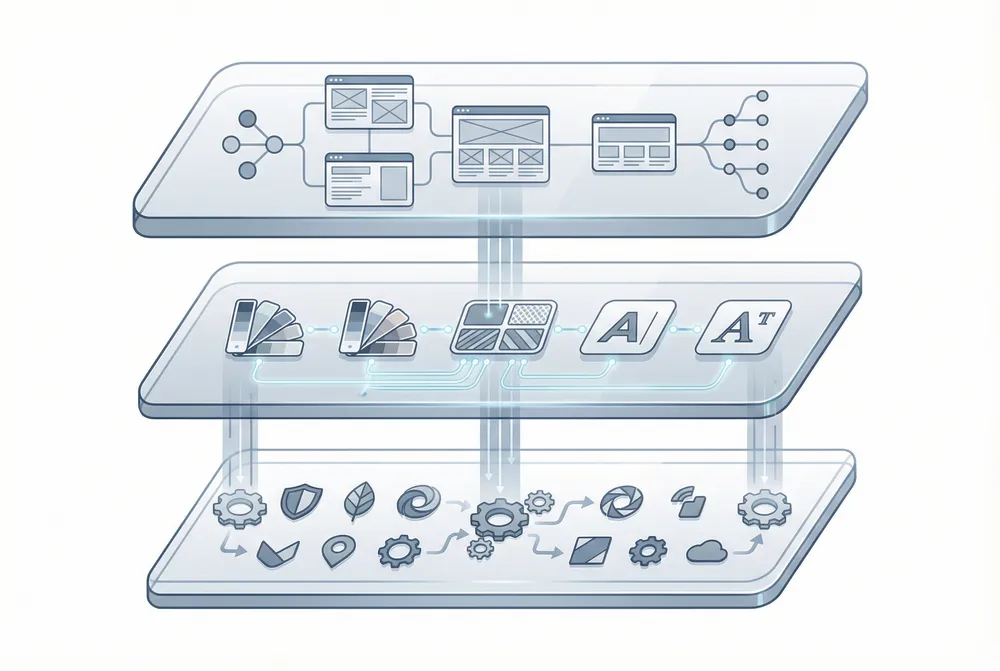
Multi-Site, Multi-Theme, and Multi-Brand Are Not the Same
A strong Umbraco architecture separates structure from styling and styling from brand identity. Multi-site is about website ownership and content boundaries. Multi-theme is about visual flexibility across shared components. Multi-brand is about identity, messaging, and user perception. When these layers are clearly separated, the platform becomes far easier to scale, manage, and evolve over time.
Why Umbraco Is a Strong Fit for This Model
Umbraco is well suited to this architecture because it is flexible in content modelling, developer-friendly, and editor-friendly. Its multisite documentation explicitly covers hosting multiple websites from one project and assigning hostnames to different root nodes. For multilingual scenarios, Umbraco's language variants allow multiple language versions under the same project.
On Umbraco Cloud, Umbraco's own documentation also notes that for practical reasons it recommends Baselines for Cloud multisite scenarios.
That makes Umbraco a good choice when a business wants to centralise platform ownership without forcing every site or brand to look and behave exactly the same.
When a Single Umbraco Installation Makes Sense
A shared Umbraco platform is usually the right approach when:
- Multiple sites have overlapping functionality
- Content types can be reused across brands
- Teams want one codebase and one deployment process
- Governance, security, and maintenance should be centralised
- Editors benefit from a familiar shared backoffice
- The organisation wants to reduce duplicate development effort
Typical examples include franchise networks, regional business units, education providers, corporate groups with sub-brands, and organisations running campaign or event sites alongside a main website.
When Separate Installations Are the Better Choice
A single installation is not always the best answer. Separate Umbraco solutions are often safer when:
- Brands need very different functionality
- Release cycles are independent
- Security boundaries must be strict
- Integrations vary significantly per brand
- Data residency or compliance rules differ
- One site's traffic profile could affect the rest
A good rule is this: share the platform only when the benefits of reuse are greater than the cost of complexity.

Recommended Architecture Approach
The cleanest model is usually:
- One shared platform
- Shared document types
- Shared component library
- Brand configuration layer
- Theme token system
- Site-specific settings and permissions
In practice, that means you keep the core platform reusable while allowing each site or brand to switch settings for logo, palette, navigation, contact details, footer links, SEO defaults, legal text, and component styling.
A Practical Content Tree Example
This structure keeps each website isolated enough for editors, while still allowing shared content where appropriate.

How Multisite Works in Umbraco
Umbraco's multisite model is based on multiple root nodes. Each root can act as a separate website, and each one can be mapped to a domain through Culture and Hostnames. The docs also note that hostnames can be associated with specific languages for multilingual setups. On Umbraco Cloud, hostname assignment follows the same root-node approach, with additional domain and certificate handling.
This is powerful because it lets you manage:
- Main brand websites
- Regional sites
- Language sites
- Campaign microsites
- Partner or white-label portals
All from one Umbraco project, when that makes business sense.
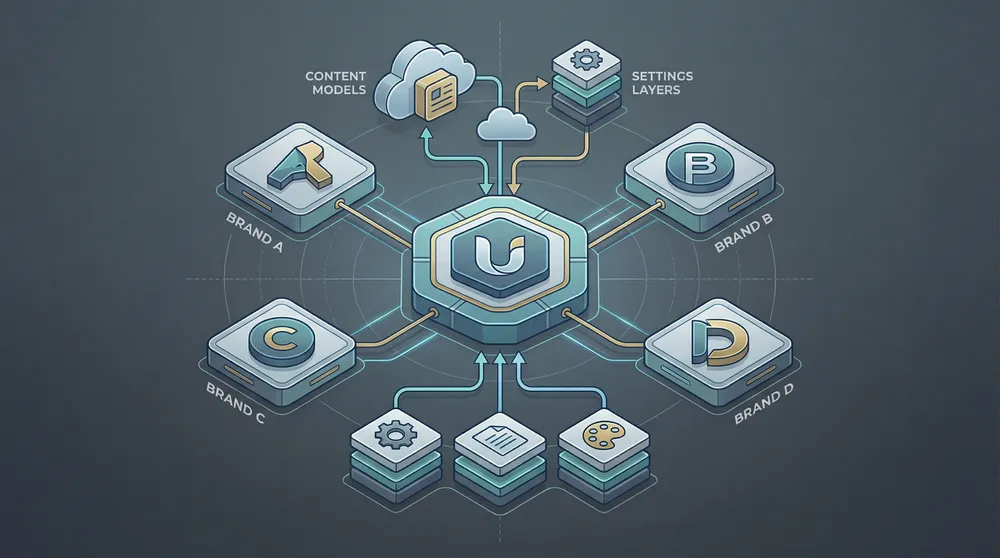
Recommended Architecture for a Shared Umbraco Platform
The best multi-site Umbraco solutions are designed as one shared platform with clear boundaries. Shared functionality such as reusable components, SEO foundations, forms, integrations, and accessibility rules should live at platform level. Each site or brand then controls its own identity through local settings such as brand assets, navigation, theme tokens, contact details, and content ownership. This reduces development cost while keeping the platform scalable.
How to Design Multi-Theme Correctly
Multi-theme should not mean copying templates for each brand. That becomes hard to maintain very quickly.
A better pattern is:
- Build a shared design system and component library
- Use theme tokens for colour, typography, radius, shadows, spacing, and button styles
- Store theme settings in a site or brand settings node
- Resolve those settings in the front end at render time
In simple terms, one hero block should stay one hero block. The theme should decide whether it looks corporate, playful, minimal, premium, or campaign-driven.
What Should Be Theme-Driven
Good candidates for theming include:
- Primary and secondary colours
- Background surfaces
- Typography families and heading scales
- Button styles
- Form field styling
- Card appearance
- Icon sets
- Imagery treatments
- Border radius and shadow rules
What Should Not Be Theme-Driven
Avoid putting structural business logic into the theme layer. Search behaviour, pricing logic, workflow rules, and integrations should stay in the application layer, not in the design layer.
Best Practice for Content Modelling
For Umbraco multi-site and multi-brand projects, content modelling matters more than almost anything else.
Recommended Document Types
Use a combination of:
- Site Root
- Site Settings
- Brand Settings
- Theme Settings
- Shared SEO Settings
- Global Content Blocks
- Page Types such as Home, Landing Page, Article, Service, Product, Contact
Recommended Pattern
Use composition and inheritance carefully so common fields are shared. For example:
- SeoBase
- OpenGraphBase
- BrandAwarePage
- NavigationSettings
- ThemeableComponent
This reduces duplication and keeps governance manageable.
Where to Store Brand and Theme Settings
A common and scalable pattern is to keep settings close to the site root. Each brand site should have a Settings node containing Brand Identity, Theme Tokens, SEO Defaults, Header Settings, and Footer Settings, with all page content organized underneath.
That gives each site a clear configuration boundary.
Typical fields include: site name, base URL, logo, favicon, primary and secondary brand colours, font references, social links, default meta image, robots and indexing rules, structured data defaults, contact details, and legal links.
Front-End Strategy for Multi-Theme and Multi-Brand
The front end should be built to consume Umbraco content and apply brand/theme settings dynamically.
A strong implementation usually includes:
- A shared component library
- A token-based CSS architecture
- Site-level configuration loaded early
- Component variants only when really necessary
- Strong caching strategy
- Clear mapping between Umbraco content and UI components
In ASP.NET Core or headless setups, theme resolution can be based on hostname, site root, or configuration mapping. The aim is to keep component logic shared and style decisions configurable.

Use Shared Components and Theme Tokens
A flexible theme system makes it possible to reuse the same components across multiple websites without copying templates for every brand. Instead of changing structure, the platform changes presentation through theme tokens such as colours, typography, spacing, shadows, and button styles. This keeps the codebase cleaner, improves maintainability, and allows new brands to be introduced faster.
How to Support Multiple Brands Without Chaos
Multi-brand platforms fail when every brand gets special exceptions. The key is to define what is shared and what is brand-owned.
Shared Across All Brands
- Core page models
- Reusable content blocks
- Accessibility standards
- Performance rules
- Analytics framework
- Technical SEO foundations
- Security model
- Deployment pipeline
Brand-Owned
- Logos and visual identity
- Colour palette
- Tone of voice
- Campaign messaging
- Regional contact details
- Brand-specific navigation items
- Legal disclaimers where needed
- Selected templates or landing page variants
That balance keeps the platform efficient while preserving true brand identity.
Governance and Editor Experience
A technically correct solution can still fail if the editing experience is messy.
For editors, the platform should make it obvious:
- Which content belongs to which site
- What is shared globally
- What is safe to reuse
- Who can edit which sections
- Which brand settings affect the public site
Good governance includes:
- Content tree conventions
- Clear naming standards
- User groups and permissions
- Documentation for shared vs local content
- Approval workflows for brand-critical updates
This is especially important when multiple teams use the same backoffice.
Media and Asset Strategy
Media management becomes more important in multi-brand solutions. By default, Umbraco stores media in wwwroot/media using its physical filesystem, and the docs note that media location can be configured through built-in configuration options before you even consider a custom filesystem provider.
For a multi-brand project, define early whether media should be:
- Fully shared
- Grouped by site
- Grouped by brand
- Offloaded to cloud storage
- Governed by naming rules and folder conventions
Without that, media libraries become difficult to manage very quickly.


Governance Matters as Much as Architecture
A multi-brand Umbraco platform should feel organised for editors, not overwhelming. Content trees should be clearly separated, shared content should be labelled, and user roles should prevent accidental cross-brand changes. Most editors should only see the site areas relevant to them, while a central digital team manages the shared structures that protect consistency across the wider ecosystem.
SEO Considerations for Multi-Site Umbraco Platforms
This area is frequently underestimated. A multi-site setup can create SEO problems if architecture is unclear.
Make sure each site has:
- Correct hostname binding
- Consistent canonical strategy
- Clean sitemap generation
- Brand-specific metadata defaults
- Environment-safe robots rules
- Proper hreflang where language or region is involved
- No accidental cross-domain duplication
Because Umbraco maps domains to root nodes and supports language-aware hostname configuration, the CMS gives you a solid base, but the SEO rules still need to be designed carefully.
Performance and Hosting Considerations
A shared installation can simplify operations, but it also concentrates risk. One badly designed site, heavy content structure, or oversized media library can affect the whole solution.
Think through:
- Cache strategy
- Traffic peaks per brand
- Search/indexing load
- Deployment frequency
- CDN usage
- Image optimisation
- Preview requirements
- Content publishing patterns
On Umbraco Cloud, the documentation specifically points teams toward Baselines for multisite scenarios for practical and performance-related reasons.
Security and Permissions
Multi-brand does not automatically mean secure separation. You still need to model permissions deliberately.
Plan for:
- Role-based access per site
- Restricted editing of shared settings
- Approval controls for global content
- Environment restrictions
- Auditability for cross-brand changes
The safest approach is to give most editors access only to their site root and their local settings, while a central platform team owns shared structures.

Common Mistakes to Avoid
The most common issues in Umbraco multi-site and multi-brand builds are:
- Duplicating document types for every brand
- Hardcoding colours and logos into templates
- Mixing global and local content with no rules
- Letting every brand invent its own component behaviour
- Failing to define hostname and SEO strategy early
- Treating multilingual and multi-brand as the same thing
- Skipping governance and permissions design
- Building a shared platform when business needs are actually too different
Recommended Implementation Roadmap
Phase 1: Architecture
Define sites, brands, themes, domains, environments, permissions, and integration boundaries.
Phase 2: Content Model
Create shared document types, compositions, settings nodes, and reusable block structures.
Phase 3: Design System
Build a shared UI library with theme tokens and controlled component variants.
Phase 4: Front-End Integration
Map brand and theme settings to runtime rendering.
Phase 5: Governance
Set permissions, editorial rules, content ownership, and publishing workflows.
Phase 6: SEO and Launch Controls
Configure domains, sitemaps, canonicals, robots, redirects, and analytics.
Final Recommendation
For most organisations, the best Umbraco approach is one platform, many sites, shared components, controlled brand settings, and token-based theming. That gives you consistency without forcing every brand into a single visual identity.
When done well, Umbraco multi-site, multi-theme, and multi-brand architecture delivers:
- Faster delivery of new sites
- Lower maintenance overhead
- Stronger brand governance
- Better reuse of content models and components
- Easier editor onboarding
- A more scalable long-term digital platform
The real success factor is not just that Umbraco can do it. It is whether the solution is designed with clear boundaries between shared, site-specific, and brand-specific concerns.
Planning a multi-site or multi-brand Umbraco platform?
Vanitech helps businesses design and implement scalable Umbraco solutions with shared architecture, flexible theming, robust governance, and future-ready implementation. Let's discuss your requirements.
Frequently Asked Questions
Answers to the most common questions about Umbraco multi-site, multi-theme, and multi-brand architectures