
Shopify Multiple Barcodes: Integration Migration Guide
Migrate Shopify multiple barcodes safely across POS, ERP, marketplaces and fulfilment with a practical integration audit, test matrix and rollout plan.
Shopify announced multiple barcode support for product variants on 8 September 2026. The change is part of Admin GraphQL API version 2026-10, which becomes stable on 1 October, and Shopify has marked it as action required.
A variant can now hold a collection of identifiers instead of one barcode string. That solves a real retail problem: the same item may need a manufacturer UPC, a private-label EAN, a GTIN used by trading partners, a reissued ISBN or an ASIN used by a marketplace. It also creates a migration risk. An ERP, product information system, supplier feed or custom app that continues reading only ProductVariant.barcode will see the first value and receive no signal that other identifiers exist.
This guide is for Australian Shopify merchants, ecommerce managers, operations teams, developers and technology decision-makers. It explains what changed, where product data can be silently truncated, how to choose an identifier source of truth and what to test before adopting the new collection.
One variant can carry a complete identifier set
The new collection is more expressive, but readers and writers need to agree on ordering, types and ownership.
Up to 20 values
Each variant can hold up to 20 barcodes, with each value limited to 255 characters.
Typed identifiers
Values can be declared as UPC, EAN, ISBN, GTIN or ASIN, or stored without a declared type.
Collection reads
The new barcodes connection exposes the full set instead of only a single primary value.
Controlled writes
The new barcodes input is available through product-set and bulk variant mutations.
Why this matters beyond the Shopify admin
Barcodes are not just labels printed on packaging. They connect an item to product master data at the counter, in a warehouse, inside a marketplace catalogue and across trading-partner systems. GS1 Australia describes the GTIN as a common identifier that helps organisations exchange product information and process items accurately when they are scanned or looked up.
Shopify also distinguishes barcodes from SKUs. A SKU is an internal inventory and reporting code. A UPC, EAN, ISBN or other GTIN is an external product identifier. Treating the two as interchangeable can create duplicate products, mismatched listings or failed scans.
| Identifier | Typical role | Migration question |
|---|---|---|
| SKU | Internal stock, storage and reporting code | Does every connected system keep the SKU separate from external barcodes? |
| EAN / GTIN-13 | Retail trade-item identification, common in Australia | Which party owns and verifies the value? |
| UPC / GTIN-12 | Retail identification often used for North American channels | Is it an alternate identifier for the same variant or a different trade item? |
| ISBN | Book and publication identification | How are reissued or format-specific identifiers handled? |
| ASIN | Amazon marketplace catalogue identifier | Should the marketplace mapping live in Shopify, a PIM or integration layer? |
| ITF-14 / GTIN-14 | Case or carton identification outside retail point of sale | Does it belong on the sellable variant, packaging master data or a logistics record? |
GS1 Australia says every product variation needs a unique GTIN. Multiple barcodes on one Shopify variant therefore should represent approved identifiers for the same sellable trade item—not a shortcut for grouping sizes, colours or packaging configurations that should remain distinct variants.
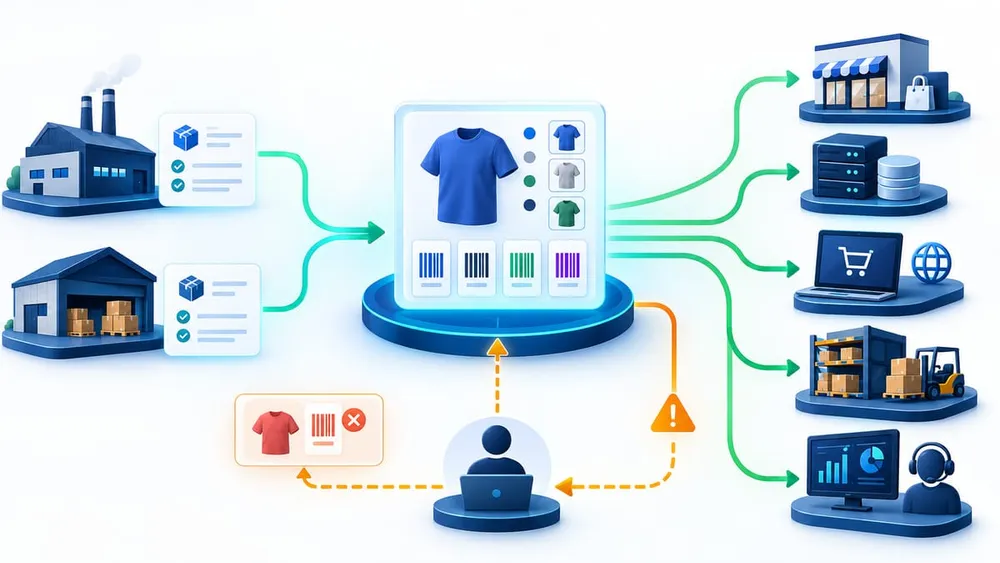
Trace each identifier from source to scan
Start with a barcode source of truth
Do not begin by adding more fields to an integration. First decide who is authorised to create, verify, prioritise and retire identifiers. The answer can differ by product range: a manufacturer may assign the GTIN for branded goods, while the retailer may be responsible for a private-label item. GS1 Australia places responsibility on the party that warrants the trade-item declarations.
| Decision | Recommended owner | Evidence to keep |
|---|---|---|
| Create or obtain a GTIN | Manufacturer, importer, wholesaler or private-label owner | Issuer, allocation record and product variation |
| Approve a Shopify barcode set | Product-data or merchandising owner | Variant ID, values, types and primary order |
| Publish to marketplaces | Marketplace or catalogue operations | Channel identifier and listing match |
| Sync to ERP, POS and warehouse | Integration owner | Last successful sync, mapping version and rejects |
| Retire or replace an identifier | Product-data owner with trading-partner review | Effective date, replacement and affected systems |
Keep the full identifier set as structured master data. Record the value, declared type, source, status, effective date and reason for priority. Shopify uses the first item as the value returned by the legacy field, so ordering is part of the integration contract—not a cosmetic preference.
Audit every barcode reader and writer
The highest-risk integrations are not necessarily the most visible ones. A product page may look correct while a nightly feed, warehouse lookup or marketplace export quietly keeps only the first value. Build an inventory of every component that reads, writes, filters, exports, imports or scans a product identifier.
| System or workflow | What to inspect | Likely failure |
|---|---|---|
| ERP or PIM sync | GraphQL selection set, mapping table and conflict rules | Only the primary value reaches the master record |
| Supplier feed | Whether an update appends, merges or replaces the set | A partial update deletes valid identifiers |
| Shopify POS | Scanning for primary and alternate barcodes at each location | Some labels work while others fail or find the wrong item |
| Marketplace connector | UPC, EAN, ISBN, GTIN and ASIN mappings by channel | Listings are duplicated, rejected or attached to the wrong catalogue item |
| Warehouse or 3PL | Receiving, picking, packing and returns scans | Carton and item codes are confused |
| Product CSV process | Whether the file format can preserve more than one identifier | A round trip flattens the collection back to one value |
| Search and service tools | Exact and scanned lookup across all identifiers | Staff cannot find an order item from the label in hand |
| Analytics and reconciliation | Identifier keys used to join product, order and channel data | Reports split one trade item into several records |
Search source code and configuration for barcode, but also inspect low-code automation, spreadsheet exports, middleware transformations and vendor-managed connectors. Ask each third party whether it supports the collection, preserves ordering and handles replace-all writes safely.
Design the API migration deliberately
Shopify has kept the legacy field working for compatibility, but that does not make it a complete representation. Reading barcode returns the first entry in the collection. Writing it updates the first entry and leaves the others in place. Moving to barcodes changes the contract from one optional string to an ordered set.
Rules your integration must handle
- Do not send both fields. A single variant input cannot set
barcodeandbarcodestogether. - Preserve the complete set. Sending
barcodesreplaces the whole collection. Read-modify-write logic must retain values that should remain. - Validate before mutation. When a type is declared, Shopify checks characters, length, prefix and check digit. Capture user errors and send rejected records to a visible work queue.
- Choose the first value intentionally. Older integrations and surfaces that still use the singular field will receive that first value.
- Use a stable key. Join systems by Shopify variant ID or an approved internal product key, not by whichever barcode happens to be first today.
- Separate item and logistics identifiers. Do not attach a case code to a consumer variant unless the business model and every scanning workflow expect it there.
API version 2026-10 is a release candidate until 1 October 2026. Use that window to update selection sets, mutation payloads, fixtures, mocks and contract tests in a non-production environment. Shopify recommends release candidates for testing, not production.
Run an end-to-end barcode test matrix
Test with controlled products that represent the real shape of your catalogue. Verify the stored collection, every downstream copy and the physical scan—not only the API response.
- Single valid GTIN: confirm legacy and collection reads return the expected value.
- Multiple typed identifiers: add a primary GTIN plus an approved alternate and confirm every collection-aware integration receives both.
- Invalid typed value: submit a bad length or check digit and verify the error becomes actionable instead of disappearing in a batch log.
- Untyped internal value: confirm the business genuinely intends to keep it untyped and that downstream systems do not mislabel it as a GTIN.
- Reordered primary value: move an identifier to first position and observe every legacy reader.
- Replace-all update: change one identifier while proving the rest of the set survives.
- POS scan: scan each item barcode at every relevant Shopify POS configuration and confirm the correct variant appears.
- Marketplace round trip: export, publish, re-import or reconcile the listing without creating a duplicate product.
- Warehouse flow: test receiving, picking, packing and returns with both item and packaging labels.
- Rollback: restore the prior approved set and prove connected systems converge without manual database edits.
Capture variant IDs, mutation payloads, responses, screenshots, scan results and downstream record IDs. A failed test should identify which contract broke and which owner must correct it.
Move from inventory to controlled adoption
Start with representative variants, measure mismatches and expand only when every connected system preserves the approved set.
Week 1: Discover
Inventory barcode readers, writers, feeds, scanners, owners and existing data exceptions.
Week 2: Design
Define the source of truth, type rules, primary ordering, mutation strategy and failure queue.
Week 3: Test
Use the 2026-10 release candidate to run contract, batch, channel, POS and warehouse scenarios.
Week 4: Pilot
Release a controlled product group, reconcile every destination and monitor before broader rollout.
Monitor identifier quality after launch
A migration is not complete when the first API call succeeds. Product identifiers change as suppliers, packaging, private-label programmes and marketplaces evolve. Add operational checks that make drift visible.
- Count variants with zero, one and multiple barcodes.
- Report duplicate values assigned to different variants.
- Track typed-value validation rejects and the time to resolve them.
- Compare Shopify's approved set with the ERP, PIM, marketplace, POS and 3PL copies.
- Alert when a writer unexpectedly changes the first barcode or reduces the collection.
- Sample physical scans after new product, supplier and packaging launches.
- Record the API version returned in
X-Shopify-API-Versionso unexpected fall-forward behaviour is visible.
Assign one owner for product-identifier policy and one for each integration. Review deprecation notices and the Shopify API health report as part of quarterly platform maintenance. The legacy field has no published removal date yet, but a collection-aware design removes the silent truncation risk now and makes the eventual removal a smaller change.
What Shopify merchants should do now
If every variant has one barcode and no integration will add a second, the immediate customer-facing impact may be small. You should still identify code and connectors using the deprecated field so the risk is known.
If you sell through Shopify POS, marketplaces, wholesale channels, a 3PL or a connected ERP/PIM, start the audit now. Choose representative products with manufacturer, private-label, marketplace or packaging identifiers. Test the new collection against the 2026-10 release candidate, but keep production on a stable API version until Shopify releases 2026-10 on 1 October.
The goal is not to collect every identifier you can find. It is to maintain one verified, governed set for each trade item and make sure every system sees the values it needs without deleting or misinterpreting the rest.
Shopify multiple barcode FAQs
Sources checked
This article was prepared from current primary guidance accessed on 9 September 2026:
- Shopify: Variants now support multiple barcodes
- Shopify: About API versioning
- Shopify: Searching for products in Shopify POS
- Shopify: Product details page
- GS1 Australia: Selling online
- GS1 Australia: Global Trade Item Number
- GS1 Australia: 1D Barcodes
Product behaviour and release timing can change. Confirm the current Shopify API documentation and your integration vendors' support before production rollout.