
Shopify Fulfillment Changes: October 2026 Guide
A practical guide for Shopify merchants to test split shipping, mixed pickup orders, 3PL integrations and market-driven shipping before October 2026.
Shopify fulfilment is changing at the point where checkout, inventory locations, shipping rates and connected systems meet. Shopify's rollout guidance says split shipping began a phased rollout in August 2026, market-driven shipping starts rolling out to merchants on 1 October 2026, and partners should aim to confirm compatibility before that date and before peak holiday volumes.
The risk is not a cosmetic checkout update. Existing API fields can appear in new combinations: one order can contain shipped and pickup items, several shipping lines or delivery groups, and fulfilment orders that require different handling. An app or internal workflow built around “one order, one delivery method” can calculate the wrong fee, send incomplete instructions or route a pickup item to a warehouse.
This guide is for Australian Shopify merchants, ecommerce managers and technology teams using custom checkout logic, headless storefronts, 3PLs, order management systems, ERPs, shipping apps, discount apps or customer-notification tools. The practical goal is to find brittle assumptions in a test environment before customers find them in production.
Three fulfilment changes to assess together
They affect different parts of Shopify, but all challenge order-level assumptions.
Ship and pickup in one order
Eligible Plus and Enterprise stores can test one checkout containing items for shipping and in-store pickup. The resulting order has separate fulfilment work that apps and staff must distinguish.
Split shipping
Checkout can present several shipments when products cannot be fulfilled together because of locations, profiles, preorders, subscriptions or other routing conditions.
Market-driven shipping
Merchant-owned shipping configuration moves toward Markets, with shipping options and rate variations organised by buyer market, products and fulfilment locations.
Why this matters now
There are several dates, and they do not all mean the same thing. Shopify's ship-and-pickup guidance says that feature is currently a test drive for Shopify Plus and Enterprise organisations. Shopify's partner timeline says split shipping is being phased in from August 2026, while the market-driven shipping rollout begins for merchants on 1 October 2026. The broader transition is scheduled to complete on 1 July 2027.
October is therefore a readiness milestone, not a claim that every store changes at once. It matters because merchants can begin opting into new behaviour, new installs may see compatibility warnings, and peak-season change freezes leave little room for rushed integration fixes.
Who should take action
- Shopify Plus and Enterprise merchants considering ship and pickup in one order.
- Stores using several locations or shipping profiles where checkout can split items into different shipments.
- Merchants using a 3PL, OMS, ERP or fulfilment service that reads orders or creates fulfilments.
- Headless storefront and mobile app teams using Storefront API delivery groups.
- Stores with shipping-rate, insurance, discount, tax, email, order-editing or post-purchase apps that may interpret delivery information.
- App owners and agencies whose custom code reads or edits merchant shipping configuration.
A simple store using standard Shopify checkout and no relevant customisations may need only configuration review and merchant testing. A store with several connected systems needs a documented compatibility project.
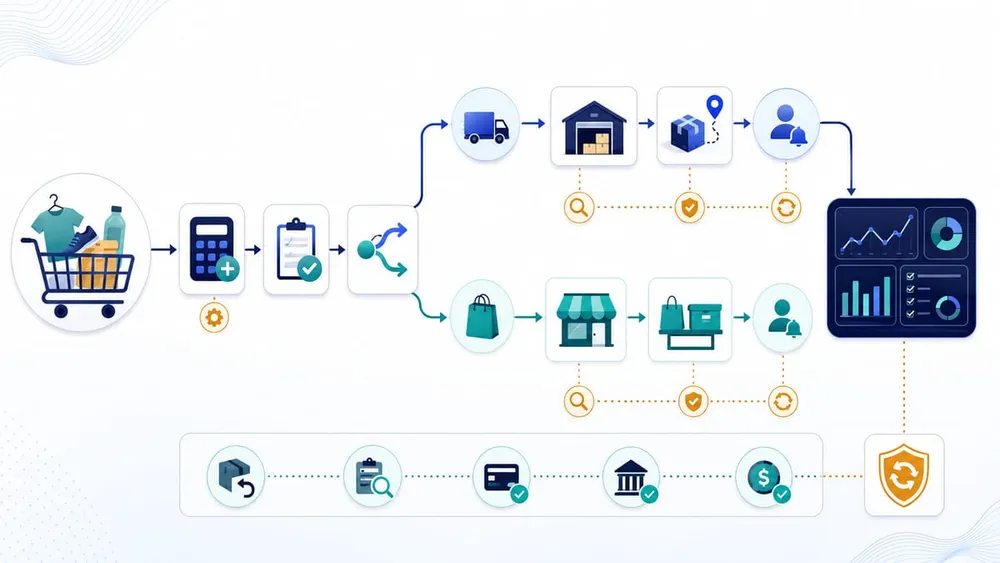
Follow each item, not only the order
Where integrations are most likely to break
Shopify's developer testing guide focuses on assumptions rather than just version numbers. That is the right way to review a merchant stack: find logic that treats the first line, group, address or fulfilment order as the whole order.
| Area | Risky assumption | What to verify |
|---|---|---|
| Shipping rates, insurance and discounts | Every item ships, so a fee or discount can use the full order total. | Calculations apply to the correct shipment or delivery group and do not charge pickup items incorrectly. |
| OMS, ERP and 3PL routing | An order is entirely shipping or entirely pickup. | Every fulfilment order is checked by delivery method before allocation, movement or fulfilment creation. |
| Checkout extensions | There is one address, one delivery choice and one instruction set. | Address validation, banners, upsells and custom fields behave correctly for each delivery path. |
| Email and customer accounts | One delivery method and one date can describe the order. | Confirmation, status and fulfilment messages show which items ship, which are collected and where. |
| Headless cart | The first delivery group represents the cart. | The storefront reads every delivery group and saves one selected option for each relevant group. |
| Reporting and support | Order-level status is enough to explain progress. | Dashboards and support views expose item-level or fulfilment-level status without marking the whole order complete too early. |
Also check legacy customisations. Shopify states that shipping scripts are incompatible with split shipping in checkout. A compatibility review should identify whether a store still depends on scripts, deprecated checkout types, REST polling or another pattern that hides the new fulfilment structure.
A practical Shopify fulfilment test matrix
Do not stop after one successful happy-path order. Build a small set of scenarios from your real catalogue, locations, rates and apps, then verify the same evidence at every step.
- Mixed ship and pickup. Put at least one shippable item and one pickup item in a checkout. Confirm rates, discounts, taxes, addresses, separate fulfilments, routing and notifications.
- Two shipping locations. Use products stocked at different locations. Check shipment grouping, rate calculation, allocation and warehouse instructions.
- Different shipping profiles. Combine standard, bulky, fragile, free-gift or supplier-fulfilled products. Confirm that checkout does not show unintended shipments or additive rates.
- Preorder or subscription plus available stock. Verify delivery promises, payment rules, notifications and partial fulfilment behaviour.
- Inventory change during checkout. Reduce availability or change the selected pickup location. Confirm the cart recovers clearly and the order cannot route an unavailable item.
- Cancellation, refund and order edit. Change only one part of a mixed order. Confirm that finance, inventory, customer messaging and third-party systems agree.
- Integration delay or failure. Pause a webhook, return an API error or make the downstream service unavailable. Confirm retries are safe, alerts are visible and staff have a manual recovery path.
For each scenario, record the cart, checkout price, delivery selections, resulting fulfilment orders, downstream records, messages and final inventory. Screenshots help, but machine-readable IDs and timestamps make discrepancies easier to trace.
How market-driven shipping changes the configuration review
Market-driven shipping is more than a renamed settings screen. Shopify's feature-preview documentation describes a different hierarchy: merchants attach shipping options to Markets, then vary rates using product and location conditions. Merchant-owned configuration moves from the DeliveryProfile API to the Markets API, while app-owned delivery profiles continue using the existing delivery-profile model.
The change can make flat rates more predictable. When several conditions inside one shipping option match a cart, Shopify can apply the highest matching rate instead of automatically adding matching rates together. That can reduce unintended overcharging, but it also means a merchant should compare new and current outcomes using representative carts.
Review these configuration dependencies
- Apps or scripts that read, create or update merchant delivery profiles.
- Products that rely on profile membership to receive special rates.
- Collections that will represent product conditions in the new model.
- Markets that target countries, states or other subdivisions.
- Locations with different carrier services, costs or transit promises.
- App-provided rates that appear alongside merchant-created options.
- Operational documentation that tells staff where shipping rules are maintained.
Inventory the rule owner as well as the rule itself. If an agency, logistics provider and ecommerce team can all change overlapping configuration, define who proposes, tests, approves and rolls back changes.
A 30-day readiness plan
Week 1: inventory and ownership
- List locations, shipping profiles, Markets, pickup settings, carrier rates and special product rules.
- List every app, custom function, webhook, integration and report that reads delivery or fulfilment data.
- Name a business owner, technical owner and rollback decision-maker.
Week 2: code and configuration audit
- Search for singular shipping-line access, first-item assumptions, order-level routing booleans and legacy checkout or REST patterns.
- Ask app vendors for written compatibility status and relevant release notes.
- Create or refresh a non-production Shopify store with representative products, locations and rules.
Week 3: execute the matrix
- Run mixed delivery, multi-location, profile, preorder, cancellation and failure scenarios.
- Reconcile checkout totals, fulfilment orders, 3PL or ERP records, emails, taxes, discounts and inventory.
- Fix the highest-impact mismatches and rerun affected scenarios.
Week 4: controlled release
- Document the change set, evidence, known limitations and rollback path.
- Brief warehouse, pickup, customer service and finance teams on the new order shapes.
- Deploy outside peak hours, monitor error queues and sample live orders.
- Keep a short post-release review and a scheduled retest before major sales campaigns.
If the audit reveals tightly coupled or unsupported integrations, do not treat a feature toggle as the whole project. Stabilise the order model, observability and manual recovery process first.
Shopify fulfilment rollout FAQs
Make your Shopify fulfilment flow testable
Sources Checked
- Shopify: The next generation of Shopify fulfillment is coming (7 July 2026)
- Shopify Developers: Market-driven shipping now available in feature preview (1 July 2026)
- Shopify Developers: Ship and pickup in one order now available in feature preview (6 May 2026)
- Shopify Help Center: Ship and pickup in one order
- Shopify: Dev Feature Preview Testing Guide
- Shopify Developers: Feature preview for market-driven shipping
- Shopify Developers: Apps in order management
- Shopify Help Center: Split shipping in Shopify Checkout
- Shopify Help Center: Shopify Scripts requirements and limitations