
Shopify Events Breaking Changes: Migration Guide
Update Shopify Events integrations for the September 2026 payload, trigger and header changes with a practical audit, migration and testing plan.
Shopify changed the contract for its next-generation Events API on 16 September 2026. The action-required update changes fields_changed from an array to an object, introduces explicit wildcards for parent triggers, removes two delivery headers and requires at least one trigger for update subscriptions.
This does not affect classic Shopify webhook subscriptions. It affects apps and integrations that have adopted Shopify Events, which is still in developer preview and available for a subset of topics. Shopify says Events and classic webhooks can coexist, so businesses can test the new mechanism without moving every integration at once.
The business risk is easy to underestimate. An endpoint can keep returning a successful response while downstream inventory, catalogue, CRM, fulfilment or marketing logic reads the wrong change signal. A parent trigger can also keep working until the next deployment, when the old syntax is rejected. Treat this as a contract migration, not a routine dependency update.
Four checks for every Shopify Events integration
Payload parsing, trigger configuration, header dependencies and update-subscription validation all need review.
Payload shape
fields_changed is now an object with added, updated and removed arrays, not one flat array.
Parent triggers
Use a terminal wildcard such as product.variants.* when subscribing to all supported fields below a parent path.
Delivery headers
shopify-event-id and shopify-resource-id are removed from Events deliveries; update packages and custom dependencies.
Update subscriptions
Every Events subscription with the update action now requires at least one trigger.
First confirm whether you use Events or classic webhooks
Search every Shopify app configuration for an [events] table and [[events.subscription]] blocks. Events subscriptions are declared in shopify.app.toml with a resource topic such as Product, one or more actions, triggers, a delivery URI and an optional GraphQL query. Classic app-specific webhooks use [webhooks] and [[webhooks.subscriptions]] blocks with topic strings such as products/update.
| Subscription | Specific 16 September change | Recommended response |
|---|---|---|
| Next-generation Events | Affected | Audit configuration, payload parsing, headers, packages and tests before the next deployment |
| Classic webhooks only | Not affected by this specific change | Do not rewrite stable handlers merely because the terminology is similar; keep normal webhook maintenance |
| Both mechanisms | Events side is affected | Trace each endpoint and queue consumer separately so classic webhook assumptions do not leak into Events handling |
| Third-party app or connector | Unknown until confirmed | Ask the vendor whether it uses Events, which version is deployed and how the September contract was tested |
Shopify describes Events as a developer-preview capability for early testing. That maturity label matters: contracts can change before stable release, so production-critical workflows need an explicit owner, version strategy and rollback path.
Map the integration before changing code
Create one row for each Events subscription. Record the app, subscription handle, topic, actions, trigger paths, query filter, custom GraphQL query, API version, delivery URI, transport, handler, queue, downstream systems and business owner. Include test stores and staging environments because an old test configuration can be promoted later.
Then search the codebase and observability stack for:
fields_changedarray iteration, length checks and fixtures;- parent trigger paths without a terminal
.*; shopify-event-idandshopify-resource-idreads;- assumptions that every update subscription can omit triggers;
- custom header allowlists, event schemas and dead-letter reprocessors;
- alerts that group failures using a removed header;
- analytics or audit tables that store the old payload shape;
- SDK or API-package versions that predate the change.
Do not limit the audit to the HTTP endpoint. A parser in the receiver can be correct while a queue consumer, data warehouse transform or replay tool still expects the old contract.
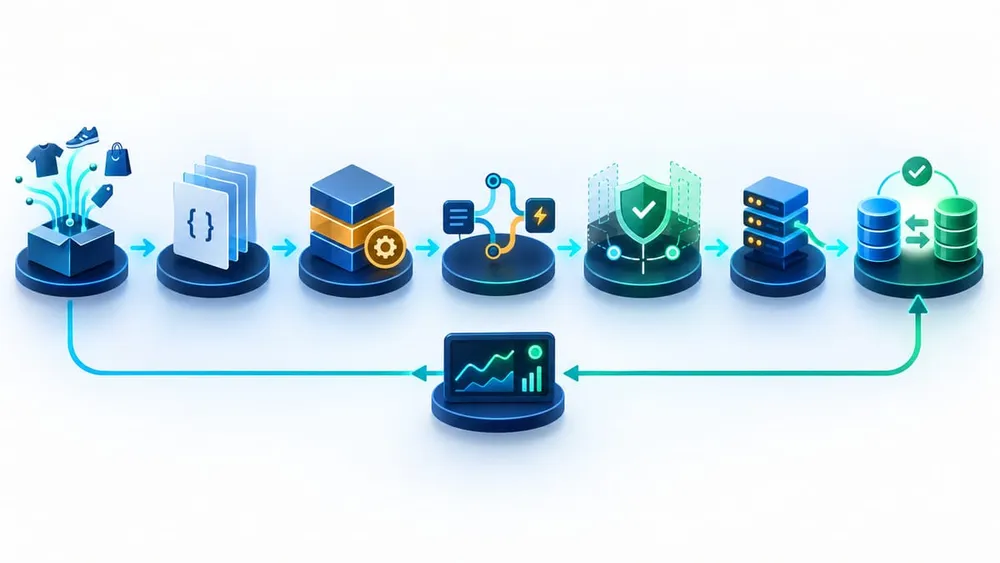
Move from inventory to verified business outcomes
Update fields_changed without losing business meaning
The old payload exposed one flat list of paths. The new shape always contains added, updated and removed arrays. A variant added to a product still arrives with the product action set to update, but its path now appears under fields_changed.added. Code that branches only on the top-level action cannot distinguish a changed child from a new or removed child.
Normalise the new object at the edge of your system. Validate that all three arrays exist, reject or quarantine malformed payloads, and pass an explicit change kind with each path to downstream logic. Keep the raw signed delivery for the minimum period allowed by your security and privacy policies so difficult failures can be diagnosed.
Test at least one add, update and remove case for every business-critical child relationship. Product variants are the obvious example, but the same discipline applies wherever a parent topic represents changes below it. Also test a delivery containing several updated paths; Shopify's Events reference says one change can report multiple paths in fields_changed.updated.
Fix parent triggers before the next deployment
A parent trigger now needs a terminal wildcard. For example, replace product.variants with product.variants.* when you intend to receive every supported field change below variants. Leaf triggers such as product.variants.price are unchanged.
Shopify says existing subscriptions continue to work, but the parent paths must use the new syntax the next time shopify.app.toml is deployed. That creates a delayed-failure trap: production can look healthy today while a routine release fails or changes the active subscription configuration tomorrow.
Review intent while changing syntax. A wildcard may preserve current breadth, but a narrower set of leaf triggers can reduce event volume and unnecessary processing. Events uses implicit OR logic across multiple trigger paths, while create and delete actions are not narrowed by triggers. Document whether each wildcard is deliberately broad or simply inherited.
Remove dependencies on retired headers safely
Events deliveries no longer include shopify-event-id or shopify-resource-id. Shopify recommends updating its API packages to current versions and removing custom dependencies on those headers. Inventory every use before deleting code: routing, validation, audit logging, correlation and idempotency are different concerns and may need different replacements.
The current Events reference documents Shopify-Webhook-Id as the unique delivery identifier used to detect duplicates. It also requires HMAC verification for HTTPS deliveries using the raw request body before trusting payload fields or headers. Do not weaken signature verification while refactoring header handling.
Make consumers idempotent even when a delivery ID is stored. Shopify's webhook guidance notes that duplicate delivery can occur and recommends reconciliation because event delivery alone is not a complete data-consistency strategy. A safe handler verifies, records receipt, acknowledges quickly, queues work, applies an idempotent business operation and records the outcome.
A seven-step migration plan
Separate contract changes from business verification so a green endpoint does not hide stale ecommerce data.
1. Inventory
List every Events subscription, handler, queue, consumer, data store and business owner.
2. Capture fixtures
Store sanitised old and new payload examples plus add, update, remove and multi-path cases.
3. Update packages
Move Shopify API packages to supported versions and review release notes before deployment.
4. Refactor
Normalise fields_changed, add explicit parent wildcards and remove dependencies on retired headers.
5. Shadow test
Use a development store and parallel processing where practical; compare outcomes without duplicating side effects.
6. Deploy and observe
Release in an attended window with logs, alerts, dead-letter inspection and a tested rollback path.
7. Reconcile
Compare Shopify source records with inventory, ERP, CRM, fulfilment and marketing destinations after cut-over.
Test outcomes across the whole integration chain
| Test | What to prove | Failure it catches |
|---|---|---|
| Add a child record | Path appears in added and the destination creates the correct record once | Old array parser or action-only routing |
| Update a leaf field | Path appears in updated and only intended automation runs | Wildcard or leaf-trigger mismatch |
| Remove a child record | Path appears in removed and downstream removal or deactivation is safe | Missing deletion semantics |
| Change several fields | Every updated path is processed without duplicate side effects | First-item-only parsing |
| Replay one delivery | Business outcome remains unchanged on the second attempt | Weak idempotency |
| Invalid signature | Delivery is rejected before payload or header values are trusted | Security regression during refactor |
| Large or failed payload | Queue, retry and dead-letter paths retain enough context for recovery | Happy-path-only testing |
| Redeploy TOML | Subscriptions validate with explicit wildcards and required update triggers | Delayed configuration failure |
For each case, verify the merchant-facing result: stock, price, product availability, order state, customer segment or connected-system record. HTTP 200 is delivery evidence, not proof that the business process completed correctly.
Monitor delivery health and data consistency
Shopify's Dev Dashboard exposes Events and webhook delivery metrics and logs, including response codes, response time, attempts, topic, shop, payload size and headers. Data can be delayed by several minutes, so combine platform visibility with your application logs, queue depth, dead-letter counts and downstream business checks.
Watch for parser exceptions, missing-array validation failures, unknown trigger paths, HMAC failures, duplicate suppression, queue lag and a sudden fall in expected event volume after deployment. A drop to zero can be more dangerous than an obvious error if the integration simply stops qualifying for deliveries.
Keep reconciliation jobs for systems where missed or mishandled changes affect revenue or operations. Shopify's webhook guidance explicitly recommends periodically fetching source data because delivery is not guaranteed and handlers can fail or be unavailable. After this migration, compare Shopify records with the receiving system for the cut-over window and repair gaps through the same idempotent processing path.
Questions to ask your developer or Shopify partner
- Do any of our apps use next-generation Events, or only classic webhooks?
- Which production workflows depend on each Events subscription?
- Where is
fields_changedparsed after the first HTTP receiver? - Which parent triggers need an explicit wildcard at the next deployment?
- Does any code, log pipeline or audit table use either removed header?
- Which Shopify API package versions are deployed?
- How are signatures verified and duplicate deliveries handled?
- Can we prove add, update and remove outcomes in a development store?
- What alerts detect silent event-volume drops and queue failures?
- How will Shopify records be reconciled with connected systems after release?
A credible answer includes the subscription inventory, code search results, new fixtures, a business-level test matrix, monitoring ownership and reconciliation evidence. A successful deployment alone is not enough.