
Posted by Mahdi
SEO Beyond Your Website: How Google Now Tracks Instagram, TikTok and YouTube in Search Console
Learn how Google Search Console Platform Properties track Instagram, TikTok, X and YouTube performance in Google Search, and how SMEs can connect social SEO with website content strategy.
Your next Google ranking might not be a webpage. It could be an Instagram Reel, TikTok, X post or YouTube video.
That is the practical meaning of Google's Search Console Platform Properties rollout. On July 29, 2026, Google announced that platform properties were globally available, letting creators, publishers and businesses track how social and video posts from Instagram, TikTok, X and YouTube perform across Google Search, Discover and Google News where the content appears.
This matters because SEO has moved beyond the website as the only measurable search asset. Search Console has long shown queries, impressions, clicks, click-through rate and position for website pages. Platform properties now bring similar first-party Google performance reporting to supported social and video accounts.
For small and medium businesses, that changes the operating model. A successful Reel is not just engagement content. A YouTube Short is not only a video metric. A TikTok that answers a practical customer question may be a discoverable Google search result, a clue for a website article, a source of social proof and a signal for what customers actually want to know.
This article explains what Platform Properties are, how to connect them, why social content matters for SEO, how query data can shape your content calendar, and how VaniTech thinks about website and social SEO as one searchable digital presence. For implementation support, see our SEO, AEO and GEO services, small business website solutions and CMS services.
The Search Asset List Just Expanded
Platform Properties give businesses a new Search Console view of supported social and video accounts, using familiar search reporting metrics.
supported platform account types: Instagram, TikTok, X and YouTube
4
core report areas: Performance, Insights and Achievements
3
default date range for Insights and Performance reports
28 days
filter Google recommends for spotting sudden search traction
24 hours
What Search Console Platform Properties Are
A Search Console property is an asset you can examine and manage in Search Console. Website properties cover a domain or URL prefix. Platform properties cover supported social or video presences such as an Instagram profile, TikTok account, X account or YouTube channel.
Google's help documentation says platform properties let creators track how content performs across Google, and that each supported account or channel should be added as its own property. The reports focus on performance and traffic insights for Google surfaces, not in-app platform reach.
Setup is intentionally different from website verification. Instead of DNS, HTML files or tag verification, a platform property can be verified through an existing website property or by direct platform login. To add one, open Search Console, choose Add property, select the platform account type, follow the prompts, and repeat the process for each active account or channel.
Adding a property does not improve ranking by itself. Google says adding a website or platform property only enables tracking. Treat this as a measurement upgrade, not a shortcut around content quality, relevance, authority or customer usefulness.
The New Social SEO Reporting Layer
The reports give SEO and social teams a shared vocabulary for content that does not live on the business website.
Performance
Clicks, impressions, average CTR, average position, search type, queries and individual posts or videos that drive traffic from Google Search, Discover or News where data is available.
Insights
Traffic trends, top-performing content, query groups, countries and the themes people use when they discover your account, profile, posts or videos through Google.
Achievements
Growth and milestone reporting, such as click-based accomplishments, which can help with simple progress reporting but should not replace deeper content analysis.
Platform Comparison
Export data from each property and compare YouTube, Instagram, TikTok and X performance side by side to find which platform earns search visibility for each topic.
Format Comparison
Use URL filters and comparison mode to compare formats, such as YouTube Shorts versus full videos or Instagram Reels versus regular posts.
Content Updates
Use annotations to mark changes such as rewriting a YouTube title or TikTok caption, then compare whether search performance changes after the update.
Why Social Content Now Matters for SEO
Social and video content has appeared in Google for years. The difference is that businesses can now measure more of that visibility in Search Console for supported accounts. Google's social and video performance guide shows examples of people finding TikTok, Instagram, X and YouTube content through Search features such as short-video carousels, latest-posts carousels and "what people are saying" results.
That gives businesses a more complete view of searchable demand. A customer might find your business through a service page, a Google Business Profile, a YouTube how-to video, a TikTok explainer, an Instagram Reel or a comparison article. From the customer's point of view, those are not separate channels. They are all discovery paths.
For SEO teams, the shift is operational. Social content should no longer be planned only around follower engagement, likes or platform-native views. It also needs to answer real search demand, use clear titles and captions, support recognisable entities, and connect back to useful website journeys where a customer can compare, enquire, book or buy.
Search Engine Land's August 18, 2026 analysis frames the same change as a way to connect social content directly to search demand. It highlights query groups, the 24-hour filter and format comparisons as workflow changes that can help shape what teams create next.
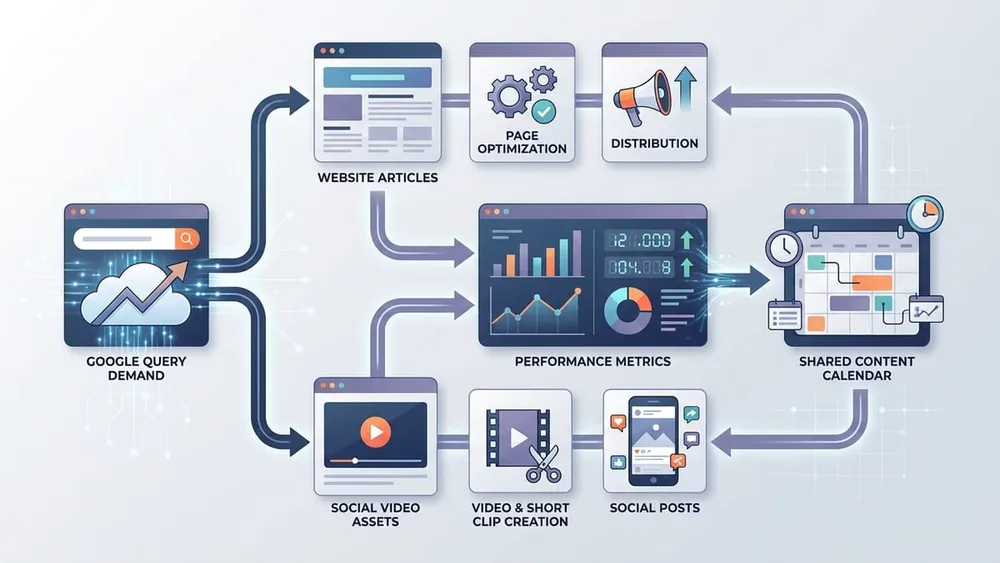
Use Search-Query Data to Plan Content
The strongest practical use case is content planning. Platform Properties can show which Google queries lead people to your social or video content. Google's guide says the Insights report groups queries into top, trending-up and trending-down themes, helping teams decide where to invest time when creating new content.
For a small business, this creates a clean workflow:
- Connect active Instagram, TikTok, X and YouTube accounts in Search Console.
- Wait a few days for data to appear for newly added properties.
- Review top queries and trending-up query groups every week.
- Identify social posts or videos that already earn search impressions or clicks.
- Compare those queries with website Search Console data.
- Decide whether the demand should become a new video, a website article, an FAQ, a case study, a service-page section or a campaign landing page.
For example, a Melbourne renovation business may discover that a YouTube Short about "small bathroom storage ideas" is earning steady Google clicks, while the website has no article or service-page section for that query. That is not just a video insight. It is a website content opportunity, a local SEO opportunity and a sales-support opportunity.
The reverse also matters. If a website article already ranks for a query but the business has no short-form video answer, the article can be repackaged into a Reel, TikTok or YouTube Short. If a social post already satisfies informational demand, the website version can go deeper: pricing, process, proof, FAQs, examples and calls to action.
Website and Social SEO Should Feed Each Other
The useful strategy is not website SEO versus social media. It is one searchable content system with different formats for different moments.
Query Becomes Video
A recurring Google query from website Search Console becomes a short explainer video, YouTube Short, Reel or TikTok that answers the same question visually.
Video Becomes Article
A social video earning search clicks becomes a full website guide with embedded media, local examples, FAQs, proof points, internal links and conversion paths.
Post Becomes FAQ
A post that attracts long-tail queries can become an FAQ section on a service page, helping both customers and search systems understand the business answer.
Article Becomes Series
A detailed website guide can be broken into a sequence of short posts, each focused on one specific customer question or objection.
Campaign Becomes Hub
A campaign can use a landing page as the canonical destination while social videos answer the discovery questions that lead customers into it.
Search Data Becomes Brief
Actual queries, countries, devices, formats and CTR patterns can shape briefs for internal creators, agencies or partners instead of relying only on trends.
What Businesses Should Measure
Start with the familiar Search Console metrics, then add the operational questions that matter for content strategy.
| Metric or signal | What it tells you | How to act on it |
|---|---|---|
| Impressions | Google is showing the social post, video, profile or channel for relevant searches or surfaces. | Look for rising topics, seasonal changes and posts with visibility but low clicks. |
| Clicks | Users are moving from Google to the platform content or interacting with a video from a Google surface. | Prioritise posts that already attract search traffic and decide whether the website needs a deeper page. |
| CTR | The result is being seen but may or may not be compelling enough to earn the click. | Review title, caption, thumbnail, opening frame, topic clarity and search-result intent. |
| Average position | The approximate visibility of that content for the selected query or report view. | Use it directionally with impressions and clicks, not as the only success metric. |
| Queries and query groups | The language customers use before they find your social or video content. | Turn the exact wording into captions, video scripts, FAQs, article headings and service-page improvements. |
| Content format | Which formats attract Google search traffic: Shorts, full videos, Reels, posts, playlists or profile pages. | Shift production effort toward formats that earn durable discovery, not just in-app reach. |
| Country and device | Where and how people are finding the content from Google. | Adapt local content, mobile-first formatting, vertical video, landing pages and calls to action. |
Platform Properties do not replace native analytics from Instagram, TikTok, X or YouTube. They answer a different question: how does this account's content perform when people discover it through Google?
They also do not give a competitor benchmark. Search Engine Land notes that this is first-party data for accounts you can verify, so absence of a query in your report is not proof there is no opportunity. It may mean competitors are capturing the demand. Combine Platform Properties with website Search Console data, Google Trends, manual search-result review and customer questions.
For related measurement planning, read VaniTech's guide to measuring traffic from ChatGPT, Google AI Overviews and Copilot.
A 30-Day Platform Properties Action Plan
Week 1: connect and baseline
- Add every active Instagram, TikTok, X and YouTube account as a separate Search Console Platform Property.
- Confirm who owns the login, verification and ongoing access.
- Record which accounts are active, which are dormant and which have enough content to measure.
- Export the first available baseline once data appears.
Week 2: compare website and social demand
- Review website Search Console queries beside social and video queries.
- Look for topics where the website ranks but social content is absent.
- Look for posts or videos earning Google clicks where the website has no supporting page.
- Flag queries that show commercial or local intent.
Week 3: build the content bridge
- Turn one high-potential social query into a website article, FAQ or service-page section.
- Turn one existing website article into a short-video series.
- Use query language in captions, titles, video scripts and article headings where it still reads naturally for people.
- Add internal links so visitors who arrive via the website can find relevant social proof or video explainers.
Week 4: measure and refine
- Track impressions, clicks, CTR, position, queries, country, device and format performance.
- Use the 24-hour filter for new posts that may be gaining quick search traction.
- Add annotations when titles, captions or thumbnails change.
- Report website and platform properties together in one visibility dashboard.
This creates a practical SEO rhythm for SMEs: listen to search demand, publish in the format customers want, expand winning assets into deeper owned content, and measure the whole searchable presence instead of one channel at a time. For a broader readiness lens, see our AI search visibility checklist for Australian businesses and customer-question content strategy guide.
Frequently Asked Questions
Clear answers for business owners, marketers and content teams getting started with social SEO reporting.
Sources Checked
- Google Search Central: Platform properties roll out globally, plus a new social and video performance guide
- Google Search Central: See how content from social and video platforms performs on Google Search
- Google Search Central: Analyze your social and video platform content performance in Search Console
- Google Search Console Help: About platform properties in Search Console
- Google Search Console Help: Add a website or platform property to Search Console
- Search Engine Land: Google Search Console now connects social content to search demand
Measure the Full Search Presence, Not Just the Website
VaniTech can help connect Search Console properties, audit website and social visibility, map query demand, and build a content strategy across pages, videos, Reels, Shorts and posts.