
Drupal Critical RCE: Patch and Response Guide
Drupal has updated its 18 November 2026 security advisory to say CVE-2026-132165 was exploited on live sites as early as 19 November at 19:00 UTC. Under specific conditions, an unauthenticated attacker can use Drupal's installer to attempt to reinstall a site, leading to site takeover or remote code execution.
The Drupal Security Team rates the issue highly critical at 20 out of 25. Supported fixes are available in Drupal 10.6.22, 11.3.22 and 11.4.13. Blocking /core/install.php can reduce exposure when an immediate update is impossible, but the official advisory still says to upgrade.
This is no longer a patch-only event. If an internet-facing site remained vulnerable after exploitation began, the response should preserve evidence, close the vulnerability, assess signs of compromise and test the business functions affected by the security release. This guide is for Australian business owners, website managers, operations teams, developers and technology decision-makers responsible for Drupal websites, portals and integrations.
Why the Drupal vulnerability is trending now
Drupal published the coordinated core security releases on 18 November. The material change since publication is the official exploitation update: the Security Team has received a report of the vulnerability being used against live sites. That turns a theoretical exposure window into an active incident-response decision.
The vulnerable component is familiar and easy to overlook. Drupal includes core/install.php for initial setup. Once a site is installed, most businesses do not need the browser-based installer during normal operations, yet the file can remain reachable unless the web server or hosting platform blocks it.
The same releases also fix CVE-2026-132166, a gadget chain that is not directly exploitable but can help another unsafe deserialization vulnerability reach remote code execution. Both fixes belong in the release decision, while the reported exploitation of CVE-2026-132165 drives the immediate urgency.
The facts that change the response
Drupal's highly critical risk score for CVE-2026-132165
20/25
Earliest reported live-site exploitation date
19 Nov
Supported fixed releases listed in the advisory
3
Maximum OAIC assessment period for a suspected eligible breach
30 days
Choose the right response lane
Version, exposure and evidence determine what happens next.
Patched before exposure
Verify the production version, confirm the installer is blocked, record evidence and monitor.
Vulnerable and online
Assign an incident owner, preserve logs, block the installer, patch immediately and assess compromise.
Steward protected
Confirm protection with the provider, but still install the fixed release and complete verification.
Unsupported branch
Apply the interim block, reduce exposure and start an urgent supported-version upgrade plan.
Check whether each Drupal environment is exposed
Do not rely on the version in a ticket or composer.json. Confirm the version actually deployed in production, staging, disaster-recovery, regional and dormant environments. Review composer.lock, the build artifact and an environment-level version check.
| Running branch | Affected range | Fixed target |
|---|---|---|
| Drupal 10 | Below 10.6.22 | 10.6.22, followed by a Drupal 11 upgrade plan |
| Drupal 11.3 | 11.0.0 to 11.3.21 | 11.3.22 or a controlled move to 11.4.13 |
| Drupal 11.4 | 11.4.0 to 11.4.12 | 11.4.13 |
| Older branches | Drupal 10.5 and below, Drupal 11.2 and below, Drupal 8 and 9 | No normal security coverage; move to a supported branch |
Also record whether the site is internet-facing, whether /core/install.php currently returns a reachable response, whether the web server can modify settings.php, whether Drupal Steward or a hosting-provider virtual patch is confirmed, and who owns the code, hosting, logs and release approval.
File permissions are not a complete defence. Drupal says preventing the web server from writing to or changing permissions on settings.php mitigates some, but not all, exploit paths.
Preserve evidence before destructive cleanup
When exploitation has been reported publicly, a quick overwrite of production can remove the information needed to understand what happened. Before rebuilding, restoring or rotating everything, preserve the evidence that is safe and practical to collect.
- Web server, CDN, WAF, PHP, Drupal, database, identity and hosting-control-plane logs.
- The current code artifact, Composer lockfile, configuration, file permissions and hashes of unexpected files.
- Recent deployments, administrator changes, new users, role changes, password resets and authentication events.
- Database backups and relevant file-system or infrastructure snapshots.
- A response timeline with collection time, time zone, collector, source and chain-of-custody notes.
Australian Signals Directorate guidance calls for evidence collection and preservation procedures, and for maintaining a detailed record of how evidence was handled. Drupal's own compromise guidance also says to review server logs, versions, credentials, other applications, shared hosting accounts and file permissions rather than assuming Drupal was the only possible entry point.
Evidence preservation must not become a reason to leave a vulnerable public site exposed. Run preservation, containment and patch preparation in parallel under one incident owner.
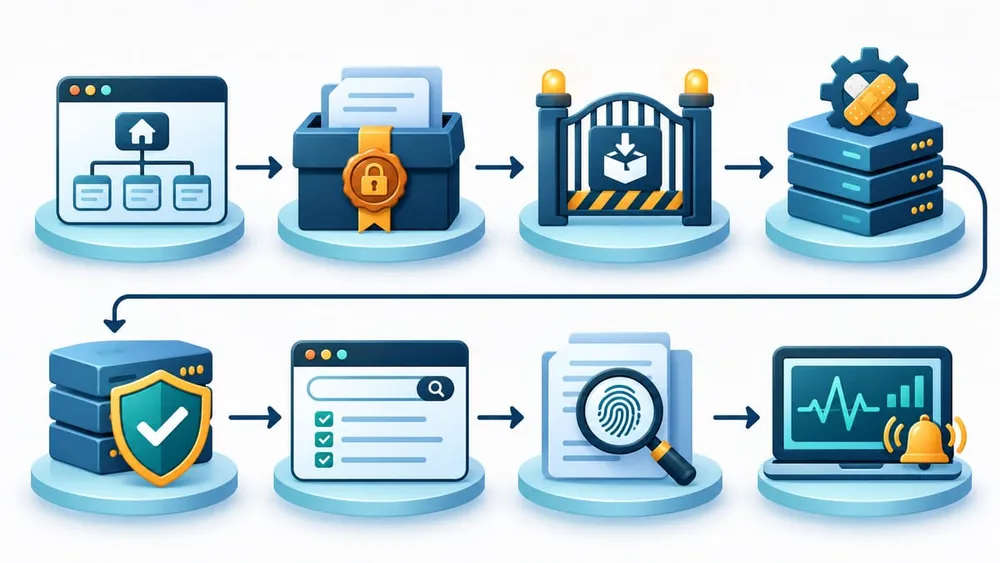
Patch Drupal through a controlled release
- Confirm the deployed branch. Match every environment to the affected ranges and assign an owner.
- Capture a rollback point. Back up the database and files, preserve the current artifact and prove that restoration is possible.
- Preview dependency changes. Run a Composer dry run in a clean checkout and review every package movement, patch and scaffold-file change.
- Update core. For the current recommended-project structure, Drupal's release notes show a targeted
composer requirefor the chosen core-recommended, scaffold and project-message versions with all dependencies. Adapt the command to the repository's existing constraints. - Run database updates and rebuild caches. Use the site's established Drush or deployment workflow.
- Deploy the reviewed artifact. Avoid an untracked production-only edit that the next deployment will reverse.
- Verify production. Confirm the running version, installer block, database status, caches, logs, cron, queues and monitoring.
If the site cannot be patched immediately, block access to the installer as an emergency containment measure. Do not treat that as a substitute for the supported release: the advisory says some paths are mitigated by permissions and known paths can be blocked, but additional paths may exist.
Block install.php in a way that survives deployment
Drupal's updated installer-hardening guidance recommends blocking /core/install.php after installation. A web-server rule is the most durable option because it survives Drupal core updates.
Apache
Drupal recommends a <Location> rule in the server configuration that denies access to /core/install.php. Test the Apache configuration before reloading it.
Nginx
The official example uses a prefix location for /core/install.php that returns 404. Drupal specifically warns against an exact-match rule because some PHP configurations can still route a path such as /core/install.php/foo to PHP.
Shared hosting and Composer scaffold
An Apache .htaccess rule is available when server configuration cannot be edited. However, Drupal's scaffold process can replace .htaccess during a normal Composer install. Store the addition in a separate tracked file and configure Drupal scaffold to append it, then test the generated artifact.
Verify the base path, a redirected installer path and a path with extra suffix information. Drupal says all checks should finish with 403 or 404. A 200 response means the block is not working. Confirm that ordinary pages and update.php or drush updatedb still work.
Test the known theme-registry regression
The 18 November security releases introduced a regression that can affect some contributed and custom code. Drupal's release notes call out the Search API module and errors such as Theme hook field not found or Theme hook time not found. Affected late-request rendering can also produce incomplete rendered output in an index.
Do not use the regression as a reason to remain vulnerable. Patch, then focus regression testing on the paths most likely to expose it:
- Search indexing and re-indexing, especially rendered HTML fields and immediate indexing.
- Content create, edit, publish and delete flows that trigger indexing.
- Custom code that renders fields, dates or themed output late in a request.
- Search result completeness, facets and downstream search integrations.
- Application logs for new theme-hook warnings after release.
Drupal says the issue will be fixed in 11.4.14. Its Drupal 10.6.22 guidance says affected 10.6 or 11.3 sites should move to Drupal 11.4 so they can take the fixed release. Record any temporary workaround, its owner and removal date.
Prove the website still does business
Content and search
Edit and publish content, rebuild indexes and confirm complete search results without new theme-hook warnings.
Customer journeys
Test forms, accounts, bookings, checkout, payments and emails with representative roles and data.
Integrations
Verify CRM, identity, analytics, search, storage, webhooks and scheduled imports or exports.
Operations
Confirm cron, queues, caches, backups, alerts, error tracking and the installer block in production.
Assess whether a vulnerable site was compromised
A successful patch proves that the fixed code is now deployed. It does not prove that the earlier site remained untouched. Scope the assessment from the site's exposure window, data, integrations and business role.
| Evidence area | Questions to answer |
|---|---|
| Installer requests | Were there unusual requests to /core/install.php, redirected installer paths or path-info variants, especially after public disclosure? |
| Files and code | Are there new or modified PHP files, web shells, unexpected scheduled tasks, altered scaffold files or unexplained permission changes? |
| Configuration and database | Did database settings, trusted hosts, services, user records, roles or site configuration change without an authorised release? |
| Identity and secrets | Were new privileged accounts created, sessions issued unexpectedly or credentials and API secrets accessed from the site? |
| Outbound activity | Did the server make unusual network connections, send abnormal email or interact with unfamiliar infrastructure? |
| Business data | Could customer, member, form, payment, portal or internal operational data have been accessed or altered? |
Do not promise that a malware scan alone can clear the site. The required depth depends on the evidence, the value of the data and the reliability of the available logs. A high-risk or ambiguous case may require a forensic specialist, legal advice, credential rotation and restoration from a known-good source rather than an in-place cleanup.
Connect the technical response to Australian privacy duties
A Drupal vulnerability is not automatically a notifiable data breach. The legal question depends on whether personal information was accessed or disclosed, whether serious harm is likely, and whether remedial action prevents that harm.
Under the Australian Notifiable Data Breaches scheme, an entity with reasonable grounds to suspect an eligible breach must conduct a reasonable and expeditious assessment and take all reasonable steps to complete it within 30 days. The OAIC treats 30 days as a maximum, not a waiting period. When an eligible breach is established, affected people and the Commissioner must be notified promptly unless an exception applies.
Bring the privacy, legal and executive owners into the response early when the site holds customer accounts, enquiry forms, health or financial information, payment-related data, staff records or sensitive portal content. Maintain one timeline that connects technical findings, containment, affected data, remedial action and notification decisions.
What to do on an unsupported Drupal version
Drupal 10.5 and below, Drupal 11.2 and below, Drupal 8 and Drupal 9 are outside normal security coverage. The advisory does not provide a supported fixed release for those branches.
Block the installer immediately, restrict unnecessary public exposure, preserve evidence and confirm whether the hosting provider supplies a relevant virtual patch. Then move to a supported branch through a controlled upgrade. For Drupal 10.6 sites, 10.6.22 is the immediate security target, but Drupal 10's closing support window and the known regression make the Drupal 11 plan part of the same risk decision.
If source control, hosting access, deployment knowledge or a working staging environment is missing, treat the job as a technical takeover. Establish the repository, infrastructure ownership, backups, secrets, domain and CDN access, monitoring and rollback path before making the site dependent on another emergency-only production change.
A practical 24-hour response plan
First two hours: establish control
- Name an incident owner and business decision-maker.
- Confirm every Drupal environment, deployed version and public hostname.
- Preserve immediately available logs, artifacts and snapshots.
- Block
/core/install.phpand verify the response. - Contact the host or managed-service provider to confirm virtual-patch coverage and available evidence.
Next six hours: patch and assess
- Prepare the fixed release in a clean non-production environment.
- Run dependency, database, cache, search and critical-journey tests.
- Review the exposed period for installer requests, file changes, privileged accounts and unusual activity.
- Decide whether specialist incident response, privacy or legal support is required.
By 24 hours: verify and communicate
- Deploy the reviewed patch and prove the running version.
- Repeat the installer-block and business acceptance checks in production.
- Record findings, gaps, owners, rollback status and the next monitoring checkpoint.
- Start credential rotation, known-good restoration or NDB assessment where the evidence requires it.
The exact sequence can change when containment or forensics requires it. The important control is explicit ownership across technical remediation, business continuity, privacy and communication.
Reduce the next emergency window
This incident exposes a maintenance gap that many SMEs carry quietly: an important website with no current inventory, tested release path or named security owner. Reduce that gap after the immediate response.
- Subscribe to Drupal security advisories and assign a person who must triage each alert.
- Track core, contributed modules, PHP, database and hosting support windows.
- Keep installer blocking, secure file permissions and other server controls in versioned infrastructure or deployment configuration.
- Retain useful WAF, web, application, identity and deployment logs for a defined period.
- Run dependency and security checks in CI, with an emergency release path that still produces a reviewed artifact.
- Maintain a short regression pack for content, forms, search, accounts, payments, integrations, cron and queues.
- Test backups and restoration, not only backup-job success.
- Review provider responsibilities so the business knows what hosting protects and what the application team must patch.
The goal is not to eliminate all risk. It is to shorten the time between disclosure, a confident decision, a safe release and verified recovery.
Sources Checked
- Drupal Security Team: SA-CORE-2026-017 remote code execution advisory
- Drupal Security Team: SA-CORE-2026-018 gadget-chain advisory
- Drupal.org: Securing the installer
- Drupal.org: Drupal 11.4.13 release notes
- Drupal.org: Drupal 10.6.22 release notes
- Drupal.org: Updating Drupal
- Drupal.org: Compromised-site guidance
- Drupal Association: Drupal Steward
- Australian Signals Directorate: Cyber incident response planning
- OAIC: Notifiable Data Breach scheme guidance
- Australian Signals Directorate: Secure your website
Sources were accessed on 22 November 2026. Security advisories and exploitation information can change quickly; confirm the current Drupal guidance before changing production.