Composable Architecture and AI: A Practical Guide
Learn how composable architecture helps AI projects connect CMS, data, APIs, governance, security, and automation without locking the business into one platform.
AI does not remove the need for good architecture. It makes architecture more important. A chatbot, recommendation engine, content assistant, lead scoring workflow, or agentic automation project needs access to content, data, permissions, APIs, business rules, logs, and human approval points. If those capabilities are trapped inside one tightly coupled platform, AI becomes harder to govern and harder to change.
Composable architecture solves this by separating the stack into smaller capabilities: CMS, search, ecommerce, CRM, analytics, identity, workflow, data storage, AI services, and front-end experiences. The MACH Alliance describes MACH technology around microservices, API-first, cloud-native, and headless ideas, and also frames modern enterprise technology around open, composable, and connected principles. For AI, that matters because models and agents need clean interfaces, not hidden business logic scattered across old systems.
For Australian businesses, the goal is not to buy every modern platform at once. The goal is to make the next AI use case easier, safer, and cheaper to test. Start with the most valuable workflow, expose the right data through controlled APIs, keep humans in the approval loop where risk is high, and design the stack so models, vendors, and channels can change. VaniTech can support this through CMS consulting, integration services, AI workflow automation, and cloud architecture.
Why Composable Architecture Helps AI
Composable architecture gives AI systems clearer inputs, safer actions, and more room to change as models and business priorities evolve.
Clean Interfaces
AI tools need APIs, not screen scraping, manual exports, or hidden business logic inside one monolithic application.
Better Data Boundaries
Content, customer data, product data, analytics, and private records can be separated so AI only receives what the use case needs.
Lower Lock-in
When AI services sit behind controlled integration layers, the business can change models, prompts, workflows, or vendors more easily.
Human Approval
Risky actions such as publishing, emailing customers, changing prices, or updating records can require approval before execution.
Safer Experiments
Teams can test AI on one workflow or content model before connecting it to wider systems or production actions.
Operational Visibility
Logs, audit trails, cost tracking, quality checks, and rollback paths are easier when AI actions pass through governed services.
What Composable Architecture Means in an AI Context
Composable architecture does not mean buying a random collection of SaaS tools. It means designing the digital platform as a set of replaceable, connected capabilities with clear contracts. Microsoft describes microservices as an architecture style for resilient, scalable, independently deployable applications. AWS Well-Architected gives teams a way to evaluate cloud architecture decisions against qualities such as security, reliability, operational excellence, performance efficiency, cost optimisation, and sustainability.
AI changes the pressure on this architecture because it can read, generate, classify, summarise, recommend, and trigger workflows. That makes weak boundaries more dangerous. A model connected directly to production systems without permissions, context limits, output validation, logging, and human approval can create business risk quickly.
| Composable layer | AI role | Business decision | Risk to manage |
|---|---|---|---|
| CMS and content model | Draft content, summarise pages, classify topics, suggest metadata, support search and answer experiences. | Which fields can AI read, draft, or update? | Incorrect content, brand inconsistency, accessibility issues, SEO regressions, and accidental publication. |
| Data and analytics | Find patterns, enrich records, generate reports, prioritise leads, and identify content gaps. | Which data is reliable enough for AI decisions? | Poor data quality, privacy exposure, biased conclusions, and misleading reports. |
| Integration layer | Let AI workflows call approved APIs for CRM, booking, ecommerce, support, search, or marketing systems. | Which actions are automated, and which need approval? | Excessive agency, weak access control, broken workflows, and uncontrolled costs. |
| Front-end channels | Power chat, guided search, personalisation, service recommendations, and content assistance. | Where should users see AI-generated or AI-assisted output? | Overreliance, poor user trust, inconsistent answers, and unclear disclosure. |
| Governance and security | Enforce policy, approvals, monitoring, testing, and audit trails. | Who owns AI risk, quality, review, and rollback? | Prompt injection, sensitive information disclosure, unsafe outputs, and unclear accountability. |
The practical lesson is simple: build AI around capabilities, not around one tool. If your CMS, CRM, search, and workflow systems can only talk through brittle exports, start with integration architecture before scaling AI automation.
AI-ready Composable Architecture Checks
Before connecting AI to business systems, confirm these foundations are in place.
Content Model
Structured content gives AI clearer context than long ungoverned pages, PDFs, and duplicated copy.
API Contracts
Expose approved actions through documented APIs with authentication, validation, rate limits, and scopes.
Data Governance
Classify data, remove unnecessary personal information, and keep sensitive sources away from low-risk experiments.
Security Controls
Plan for prompt injection, output validation, access control, sensitive data leakage, and excessive agency.
Cloud Operations
Monitor reliability, latency, cost, logs, environment separation, alerts, and rollback for AI-connected workloads.
Measurement
Track quality, cost, user adoption, review effort, error rates, and the business outcome the AI workflow is meant to improve.
A Practical Reference Architecture
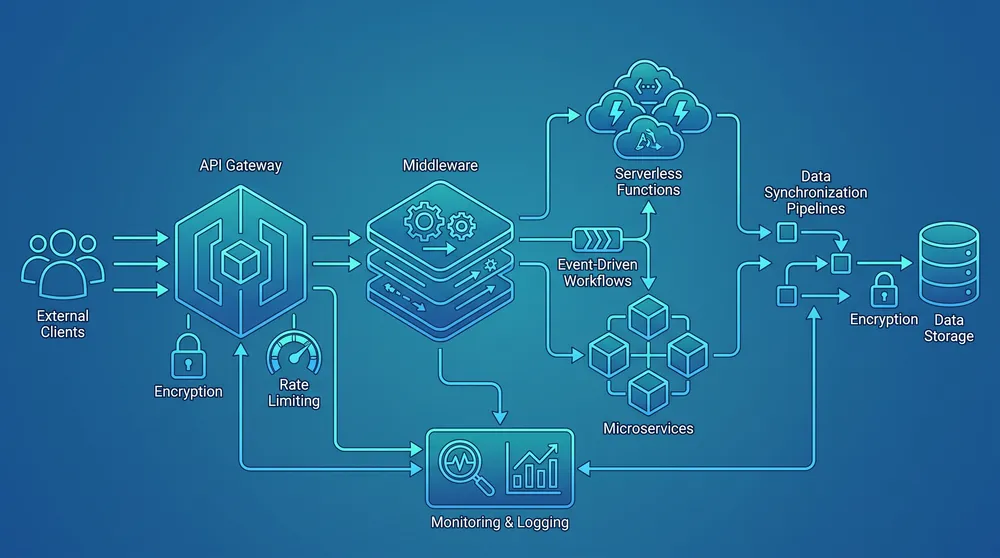
A good AI-ready composable architecture usually has five layers. First, source systems hold content, customer records, products, transactions, documents, analytics, and knowledge. Second, an integration layer exposes approved APIs and events. Third, a policy layer controls identity, permissions, consent, logging, and data boundaries. Fourth, AI services handle retrieval, generation, classification, summarisation, or workflow decisions. Fifth, channels such as websites, intranets, support portals, apps, and marketing tools deliver the experience.
This structure is deliberately boring. It keeps AI away from direct uncontrolled access to production systems. It lets the business test one use case at a time. It also makes vendor replacement more realistic because the CMS, model, vector database, search platform, CRM, or front end can change without rewriting every workflow.
Where AI Fits Best First
Most businesses should not begin with fully autonomous agents. Start with assisted workflows where the cost of review is lower than the cost of manual work. Good first use cases include:
- Content operations: metadata suggestions, content briefs, summaries, redirect notes, page improvement recommendations, and content audits.
- Customer service: draft support replies, internal knowledge search, case classification, and agent assist workflows.
- Sales and marketing: lead enrichment, proposal drafts, CRM notes, campaign variants, and audience segmentation support.
- Operations: document extraction, approval routing, exception detection, and repetitive back-office workflow assistance.
- Search and discovery: better site search, guided answers, product finders, internal knowledge retrieval, and AI-readable service pages.
For CMS-heavy businesses, pair this with content governance. Our article on CMS governance for marketing teams explains how roles, workflow, content models, and publishing rules reduce operational risk. For data and AI controls, see AI data safety for Australian businesses.
What Not to Do
- Do not connect an AI assistant directly to production systems without scoped permissions and logging.
- Do not send all CMS, CRM, or customer data to a model when the use case only needs a small subset.
- Do not rely on prompt wording as the only security control.
- Do not let AI publish, email, refund, delete, or update important records without a clear approval rule.
- Do not build an AI feature that only works with one vendor if the business expects model or platform changes.
- Do not skip monitoring because the first prototype looked accurate in a demo.
Governance: The Part That Makes AI Sustainable
NIST says the AI Risk Management Framework is voluntary and is intended to improve the ability to incorporate trustworthiness considerations into the design, development, use, and evaluation of AI systems. NIST has also published a generative AI profile for AI risk management. In Australia, the Voluntary AI Safety Standard was published on 5 September 2024 and updated on 2 December 2025. It provides practical guidance for safe and responsible AI use and includes 10 voluntary guardrails for organisations across the AI supply chain.
These frameworks point to the same operational reality: AI needs owners, risk assessment, transparency, monitoring, testing, accountability, and human oversight. Composable architecture helps because controls can be applied at the right layer. The CMS can control publishing. The integration layer can control actions. The identity layer can control who is allowed to use a workflow. The AI layer can control model choice and retrieval sources. The logging layer can record what happened.
Security also needs to be designed in. OWASP lists major LLM application risks including prompt injection, insecure output handling, training data poisoning, model denial of service, supply chain vulnerabilities, sensitive information disclosure, insecure plugin design, excessive agency, overreliance, and model theft. In a composable architecture, those risks are handled with layers: input validation, retrieval controls, least-privilege APIs, output validation, human approval, monitoring, rate limits, and incident response.
Implementation Roadmap
- Map the business workflow. Choose one valuable workflow such as content approval, support triage, lead qualification, internal search, or reporting.
- Inventory systems and data. Record the CMS, CRM, ecommerce, search, analytics, documents, APIs, user roles, and sensitive data involved.
- Define allowed AI actions. Separate read-only assistance, draft creation, recommendations, approved updates, and fully automated actions.
- Design the integration layer. Use controlled APIs, queues, events, permissions, validation, and observability rather than direct database or admin access.
- Add governance controls. Define owners, approvals, audit logs, retention, escalation, model review, and rollback.
- Test with real edge cases. Include incomplete data, private data, hostile prompts, ambiguous requests, poor-quality content, and operational failures.
- Scale by capability. Once one workflow works, extend the pattern to another workflow rather than building a separate AI stack each time.
If your current architecture is already fragmented, VaniTech can help rationalise it through cloud architecture, system integration, and ongoing support. If the CMS is the foundation, start with content management system services and a practical content model review.
Sources Checked
Composable Architecture and AI FAQs
Short answers for business and technology teams planning AI-enabled digital platforms.
Build an AI-ready Composable Platform
VaniTech can help map your CMS, data, integrations, cloud architecture, governance, and AI workflow opportunities into a practical implementation plan.