
AI Data Safety: How Australian Businesses Can Use AI Safely
Learn how Australian businesses can use AI safely with clear data rules, approved tools, vendor checks, human oversight, monitoring and incident response.
AI can summarise documents, draft customer messages, analyse records, assist developers, and automate routine work. It can also move information outside the systems and controls your business normally relies on—sometimes through something as ordinary as an employee pasting text into a prompt.
That is the central AI data safety problem. The risk is not limited to a spectacular cyberattack. It includes customer information entered into an unapproved tool, confidential documents retained longer than expected, an AI integration with excessive access, incorrect output treated as fact, and a team that has no idea what to do after a mistake.
The answer is not to ban AI or trust a vendor’s security badge. Safe adoption requires a small operating system around AI: clear data rules, approved use cases, accountable people, suitable tools, technical controls, human review, monitoring, and an incident process.
This guide explains how Australian businesses can build that system without turning every AI experiment into a six-month governance project.
What AI Data Safety Actually Means
AI data safety is the practice of protecting information, people, and business operations throughout an AI system’s lifecycle. It has at least five parts:
- Privacy: personal information is collected, used, disclosed, retained, and deleted appropriately.
- Confidentiality: customer data, contracts, strategy, source code, credentials, and intellectual property do not reach unauthorised people or systems.
- Security: accounts, integrations, models, data stores, and connected business systems are protected against misuse and attack.
- Accuracy and fairness: AI output is checked before it affects a person, decision, publication, or business record.
- Control: a responsible person can explain the use, intervene, investigate problems, and stop the system when necessary.
These concerns overlap. A secure AI product can still be used for an inappropriate purpose. A privacy-compliant input can still produce a dangerously incorrect answer. An accurate model can still have excessive access to email, files, or customer records.
This is why “the vendor says it is secure” is evidence for one part of the assessment, not the conclusion.
Why Everyday AI Use Creates Unusual Data Risk
Traditional business software usually has a defined job, known data fields, and permissions established by administrators. General-purpose AI tools invite open-ended instructions. That flexibility is useful, but it makes the boundary around the data less obvious.
An employee may paste:
- a customer email to improve its wording
- a spreadsheet to find a pattern
- a contract to summarise clauses
- application logs to diagnose a fault
- source code to fix a bug
- interview notes to prepare a report
- a medical or financial document to draft a response
Each action can send information to a third-party system. The business then needs to know what was transmitted, why it was allowed, where it is processed, who can access it, how long it remains, whether it is used for another purpose, and how it can be deleted.
The OAIC’s guidance on commercially available AI products makes two points especially relevant to this scenario:
- privacy obligations can apply to personal information entered into an AI system and to output containing personal information; and
- as a best practice, organisations should not enter personal information—particularly sensitive information—into publicly available generative AI tools.
The OAIC also notes that inferred or AI-generated information about an identifiable person can be personal information even when it is incorrect. AI safety therefore covers what goes into the system and what comes out.
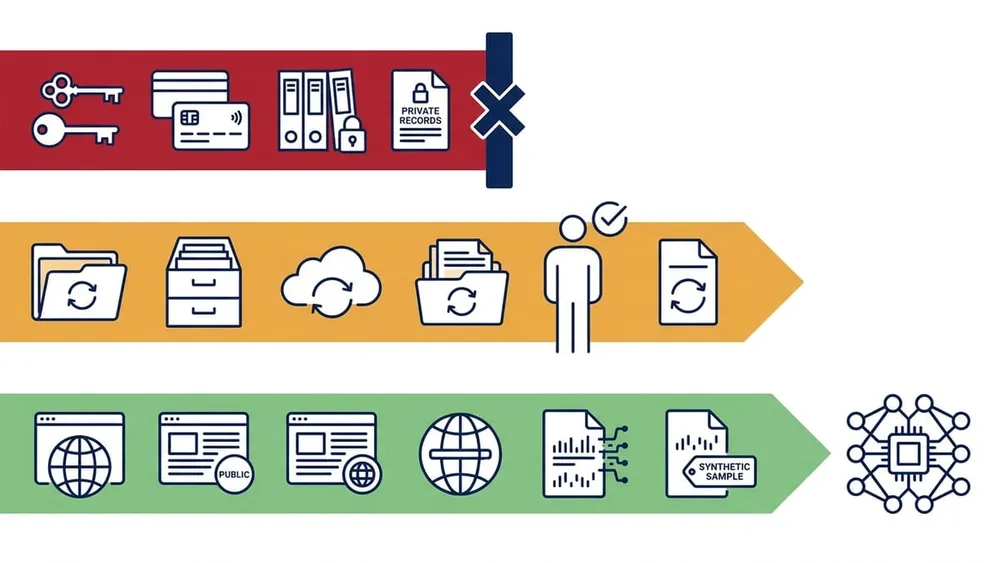
Use a Red-Amber-Green Data Rule
Policies fail when employees need a privacy lawyer beside them for every prompt. A simple classification rule makes the safe choice easier.
The following model is a VaniTech implementation recommendation. It should be adapted to your contracts, regulatory obligations, risk profile, and approved tools.
| Class | Examples | Default rule |
|---|---|---|
| Red: do not enter | Passwords, API keys, authentication tokens, payment-card data, health information, government identifiers, customer records, employee files, legal advice, unpublished financial results, highly confidential contracts, security vulnerabilities | Never enter into a public AI tool. Use only a specifically approved system and use case with documented authority and controls—or do not use AI. |
| Amber: approved use only | Internal documents, source code, commercial proposals, meeting notes, supplier information, business analytics, draft strategy, non-public policies, de-identified datasets | Use only an approved business tool, for an approved purpose, with minimum necessary data and required review. Confirm that context cannot identify people or expose confidential information. |
| Green: generally suitable | Public website copy, published reports, public product information, generic brainstorming, synthetic examples, non-confidential templates | May be used in approved tools, subject to copyright, accuracy, reputation, and output-review rules. |
This model deliberately treats credentials as red even when a vendor offers strong privacy terms. Secrets should not be placed in prompts. If a workflow needs system access, use a controlled integration, scoped identity, and managed secret storage.
De-identification helps, but it is not magic
Removing a name does not always make information safe. A combination of job title, location, age, rare condition, transaction, or event date may still identify a person. Free-text documents can also contain names and identifiers in headers, comments, metadata, filenames, and tracked changes.
Before using de-identified data:
- remove direct identifiers and unnecessary fields
- check free text, metadata, and attachments
- aggregate or generalise distinctive values
- consider what other information the recipient may possess
- use synthetic data for testing where practical
- document who assessed the residual risk
Treat de-identification as risk reduction, not a promise that re-identification is impossible.
Eight Controls for Safer AI Use
1. Keep an AI register
You cannot protect AI use you do not know exists. Maintain a register of AI products, integrations, pilots, and important use cases.
For each entry, record:
- the business purpose and owner
- the accountable decision-maker
- users and affected stakeholders
- data categories and sources
- systems the AI can access or change
- vendor, model, hosting, and subprocessors where relevant
- risk assessment and approved controls
- testing and acceptance results
- human review requirements
- monitoring, review, and retirement dates
The Australian Government’s current Guidance for AI adoption recommends an AI register and documentation covering use cases, technical details, data, testing, risks, controls, audits, and review dates.
Start with a spreadsheet if necessary. A modest register that people maintain is more valuable than an elaborate governance platform nobody updates.
2. Assign an owner and classify the use case
Every material AI use should have a named business owner. “IT” or “the vendor” is not an accountable person.
Classify each use case by potential impact. A tool that rewrites public marketing copy is not equivalent to one that recommends whether a customer receives a service, drafts legal correspondence, reads patient information, or can update production systems.
Ask:
- What happens if the input is disclosed?
- What happens if the output is wrong, biased, or manipulated?
- Can the system make or influence a decision about a person?
- Can it send messages, change records, spend money, or run code?
- Can a human detect and reverse an error?
- How many people could be affected?
Higher-impact uses need stronger evidence, narrower access, more testing, and more active human oversight. Some uses may be unsuitable even when the underlying product is approved.
3. Approve tools and prohibit shadow AI
A blanket ban often pushes use out of sight. Give staff a safe path instead:
- publish a short list of approved AI products and uses
- explain which data classes each product may handle
- provide an approval route for new tools or integrations
- block or restrict clearly unsuitable services where proportionate
- review browser extensions, meeting bots, plugins, and AI features added to existing software
- make reporting a mistake safe and easy
Approval should be product-specific and configuration-specific. The consumer version and enterprise version of a service may have different contracts, retention settings, administrative controls, and data-use terms. Those differences must be verified; they should not be assumed from the brand name.
4. Assess the vendor, contract, and data flow
Before uploading business data, map the full flow:
User or business system
        |
        +-- prompt, file, image, audio or record
        |
        v
AI product and model provider
        |
        +-- logs, safety systems, support access and subprocessors
        +-- connected storage, search indexes and integrations
        +-- output returned to users or downstream systems
The OAIC guidance advises due diligence covering suitability, testing, human oversight, privacy and security risks, and access to personal information.
Do not stop at “data is encrypted”. Encryption matters, but it does not answer whether the provider may retain content, use it to improve services, send it overseas, expose it to support personnel, or keep it after the contract ends.
5. Configure least privilege
AI becomes more consequential when connected to business systems. A chatbot that can read one approved knowledge base has a smaller blast radius than an agent with broad access to email, cloud drives, CRM records, finance systems, and production tools.
Apply familiar security disciplines:
- single sign-on and multi-factor authentication
- role-based access and separate administrator accounts
- minimum required connectors and permissions
- read-only access unless write access is essential
- managed service identities rather than shared accounts
- secrets stored outside prompts and code
- logging for access, configuration, and material actions
- retention and deletion settings aligned with business need
- environment separation for testing and production
- approval steps for external messages, payments, record changes, and destructive actions
Review permissions when a pilot becomes a production workflow. Temporary access has a curious talent for becoming permanent furniture.
6. Minimise data and separate contexts
The safest sensitive record is the one the AI system never receives.
Before sending information, ask whether the task can be completed with:
- a smaller excerpt rather than a whole document
- a summary rather than the raw record
- synthetic examples rather than real customer data
- fields relevant to the task rather than the full dataset
- local preprocessing that removes identifiers
- retrieval rules that limit which documents can be searched
Keep customers, teams, security classifications, and environments separated where the platform allows it. Test that permissions are respected by retrieval, search, exports, logs, and connected tools—not only by the main application screen.
7. Require human review where harm is possible
Human oversight is not asking someone to glance at an answer while rushing. Define what the reviewer must check, what evidence is available, and when the AI output must be rejected or escalated.
Review is especially important when output affects:
- legal, financial, health, employment, or eligibility matters
- customer complaints or commitments
- public claims and factual reporting
- personal information or individual profiles
- cybersecurity actions
- code deployed to production
- payments, purchases, deletions, or external communications
The Australian Government’s AI adoption guidance calls for accountable human oversight, intervention mechanisms, and training on system capabilities, limitations, and failure modes.
For high-impact decisions, preserve an alternative path that does not depend on the AI system. A person should be able to question the outcome and reach someone capable of reviewing it.
8. Test, monitor, and rehearse incidents
Approval is not the finish line. AI products, connected data, prompts, configurations, and user behaviour change.
Before deployment, test:
- expected tasks and known edge cases
- attempts to reveal restricted information
- prompt injection and malicious document content
- permission boundaries between users and data stores
- unsupported or fabricated answers
- unsafe tool actions
- logging, alerts, rollback, and shutdown
After deployment, monitor relevant indicators such as restricted-data events, failed access attempts, unusual exports, user complaints, output corrections, unsafe actions, model or vendor changes, and unresolved exceptions.
The Australian Government guidance recommends documented acceptance criteria, pre-deployment testing, ongoing monitoring, response processes, periodic review, and additional testing proportionate to risk. NIST’s Generative AI Profile similarly treats risk management as part of design, deployment, use, and evaluation—not a one-off check.
A 15-Question AI Vendor and Product Checklist
Use these questions before approving a tool that will handle non-public information:
- What exact business use is being approved?
- Which data categories may and may not enter the system?
- Is customer content used to train, tune, evaluate, or improve any model or service?
- What content, metadata, logs, and outputs are retained, and for how long?
- Can administrators and users delete content, accounts, indexes, and backups?
- Where is data stored and processed, and which subprocessors receive it?
- Who can access customer content for support, safety, or operations?
- What encryption, identity, access, and tenant-isolation controls apply?
- Does the product support single sign-on, MFA, role controls, audit logs, and retention policies?
- What connectors and tool permissions are enabled by default?
- How are security incidents reported, investigated, and communicated?
- How are model, product, terms, subprocessor, and data-use changes notified?
- What testing evidence exists for the intended use—not merely for the product in general?
- Can the business export its data and safely decommission the service?
- Do the contract, privacy notice, internal policy, and actual configuration tell the same story?
Record the evidence, decision, conditions, owner, and next review date. A questionnaire without a decision trail is paperwork wearing a hard hat.
What to Do If Sensitive Data Is Entered Into an AI Tool
Treat accidental disclosure as an incident, not an embarrassing prompt to quietly delete.
1. Stop further exposure
Pause the workflow, revoke shared links or tokens, disable affected integrations if necessary, and prevent additional users or automated processes from sending data.
2. Preserve facts
Record who used the tool, when it occurred, what information was involved, which account and product configuration were used, what outputs were produced, and whether connected systems acted on them. Preserve relevant logs without spreading the sensitive data further.
3. Use available deletion and support channels
Delete conversations, files, indexes, or stored content where the product supports it. Contact the provider through the contractual security or privacy channel to clarify retention, access, backups, and containment. Do not assume pressing delete removes every copy immediately.
4. Assess the risk
Involve the appropriate privacy, security, legal, and business owners. Consider the sensitivity and volume of data, affected people, likelihood of access or misuse, contractual duties, system actions, and whether effective containment occurred.
5. Consider notification duties
The OAIC’s Notifiable Data Breaches guidance states that organisations and agencies covered by the Privacy Act must notify affected people and the OAIC when a personal-information breach is likely to result in serious harm. Whether a specific incident meets that threshold requires a proper assessment.
Other contractual, professional, sector, insurance, or government-reporting duties may also apply. Obtain advice appropriate to the incident rather than relying on a generic checklist.
6. Fix the system, not only the prompt
Look for the control that failed: unclear policy, missing approved alternative, excessive permissions, poor tool configuration, inadequate training, absent detection, or a workflow that encouraged copying full records. Update the register, risk assessment, controls, and training.
A Practical 30-Day AI Safety Plan
Week 1: discover and classify
- Survey teams for AI tools, browser extensions, meeting bots, integrations, and pilots.
- Create the AI register and assign owners.
- Identify workflows using personal, sensitive, confidential, or regulated information.
- Publish an interim red-amber-green data rule.
Week 2: approve and configure
- Select approved tools for common low-risk tasks.
- Review contracts, data flows, retention, subprocessors, and data-use terms.
- Enable SSO, MFA, role controls, logs, and suitable retention settings.
- Remove unnecessary connectors and permissions.
Week 3: test and train
- Define expected use, prohibited use, and human-review requirements.
- Test data leakage, permissions, unsafe output, prompt injection, and shutdown.
- Train staff with realistic examples from their work.
- Give people a simple channel to request a use case or report a mistake.
Week 4: monitor and rehearse
- Review logs and establish a small set of meaningful alerts.
- Run a tabletop exercise for accidental sensitive-data entry.
- Confirm privacy notices and customer-facing AI disclosures are accurate.
- Set risk-based review dates and track unresolved actions.
The aim after 30 days is not perfect maturity. It is visibility, ownership, sensible defaults, and the ability to respond.
Common AI Safety Mistakes
“We told staff not to enter confidential data”
That is a start, not a control system. Staff need examples, approved alternatives, configuration, training, monitoring, and a safe reporting route.
“We pay for the enterprise version, so the data is safe”
Enterprise plans may provide stronger contractual and administrative controls. They do not automatically make every use lawful, appropriate, correctly configured, accurate, or well supervised. Verify the product and settings actually in use.
“The data was anonymised”
Check whether individuals can be identified from context, rare attributes, metadata, or other available information. Anonymisation is a conclusion that needs evidence, not a find-and-replace operation.
“A human is in the loop”
Define the human’s authority, competence, evidence, checks, and time. A reviewer who routinely clicks approve is decorative governance.
“We will govern AI after the pilot”
Pilots often use real data, create integrations, and influence decisions. Apply lightweight controls from the beginning, then scale them with the risk.
“AI safety belongs to IT”
IT can manage platforms and security controls. Business owners decide purpose and acceptable impact; privacy and legal specialists interpret obligations; information owners approve data use; users operate the workflow. Accountability is shared but should never be vague.
AI Safety Is a Business Capability
The safest organisation is not the one that claims it never makes an AI mistake. It is the one that knows where AI is used, limits what each system can access, gives employees workable rules, checks important outputs, detects problems, and responds without confusion.
Start with visibility and a clear data boundary. Add approved tools, accountable owners, due diligence, least privilege, human control, and monitoring. Then revisit the controls as the technology and use cases change.
AI adoption can move quickly without becoming reckless. The trick is to make the safe path the easy path—and to ensure someone is genuinely responsible when the path changes.
This article provides general information and implementation guidance, not legal advice. Privacy, cybersecurity, employment, intellectual-property, and sector-specific obligations depend on the organisation and use case.
Frequently Asked Questions
Practical answers for Australian teams introducing generative AI into everyday work.
Sources Checked
- OAIC: Guidance on privacy and the use of commercially available AI products
- Australian Government: Voluntary AI Safety Standard
- National AI Centre: Guidance for AI adoption
- NIST: Artificial Intelligence Risk Management Framework—Generative Artificial Intelligence Profile
- OAIC: Notifiable data breaches
Build AI Workflows With Clear Data Boundaries
VaniTech can help assess AI use cases, data flows, integrations, controls, and governance before sensitive information enters the wrong system.