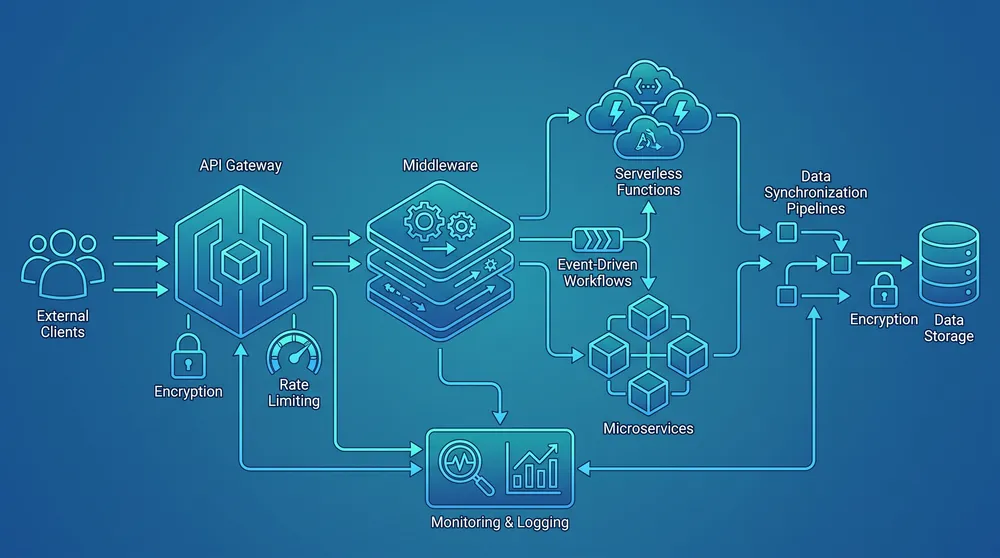
AI Integration Strategy for Australian Businesses
A practical AI integration strategy for Australian businesses covering CRM, CMS, accounting, support, data quality, governance, APIs, automation, and AI search readiness.
The strongest trend in integration and automation is the move from isolated AI experiments to connected AI workflows. Australian businesses are no longer only asking, "Can AI write this?" They are asking how AI can triage enquiries, update CRM records, draft proposals, classify documents, improve reporting, support content teams, and still keep people in control.
That makes integration the practical bottleneck. AI needs reliable access to content, customer records, product data, support history, forms, analytics, documents, and workflow rules. Without clean integrations, the team ends up copying data into prompts, exporting spreadsheets, or trusting disconnected tools that cannot see the real business context.
The best subject to build content around is therefore AI-ready integration: how to connect CMS, CRM, accounting, marketing, support, ecommerce, and reporting systems so automation is useful, measurable, and safe. This article explains the strategy. The related articles in this cluster cover AI agents, content operations automation, and customer-question content strategy for AI search.
What Is Changing in 2026
The market is moving from tool adoption to workflow design. Businesses need system connections, governance, and useful content/data structures before AI can deliver repeatable value.
Integration Is the Bottleneck
AI workflows need structured access to CRM, CMS, accounting, ecommerce, support, documents, analytics, and operational data.
Automation Needs Controls
Useful automation combines rules, approvals, logging, error handling, and human review rather than handing every step to an AI model.
Content Must Be AI-ready
AI search and AI-assisted workflows depend on clear answers, visible evidence, structured data, internal links, and maintained source information.
Agents Are Narrow First
Task-specific agents are emerging, but most businesses should start with assisted workflows before allowing autonomous actions.
Data Quality Sets the Ceiling
Personalisation, reporting, AI search, and automation all fail when records are incomplete, duplicated, stale, or scattered across systems.
Governance Is Commercial
Trust, privacy, security, review, cost control, and accountability now affect whether AI automation gets adopted by real teams.
Why AI Integration Is Now a Content and Automation Topic
Integration used to sound like a back-office technical topic. In 2026, it directly affects marketing, content, sales, support, operations, and search visibility. A website form that does not reach the CRM quickly affects sales. A CMS with unstructured service content affects AI search. A support system disconnected from the knowledge base slows customer service. An automation that cannot read the right data creates manual work instead of removing it.
The National AI Centre reported that 43% of Australian SMEs had some level of AI adoption across December 2025 to February 2026, and that broad adoption among AI users was increasing. The same report identified trust, relevance, and not knowing where to start as major blockers. An integration strategy answers those blockers because it turns AI from an abstract technology into a controlled business workflow.
International trend reports point in the same direction. Gartner's 2026 agentic AI research says interest is high but many deployments are still narrow, with governance, security, cost management, platforms, orchestration, and development practices becoming critical. Zapier's Q2 2026 AI Workflow Index found that AI steps are only one part of production workflows; rules, logic, app connections, messaging, records, tickets, and storage still do most of the operational work around the AI step.
Start With the Systems Map
A practical AI integration strategy starts by mapping where important information lives and where business actions happen. For most Australian SMEs and mid-sized businesses, the map includes the website, CMS, forms, CRM, email, accounting, ecommerce, booking, support, documents, spreadsheets, analytics, and reporting tools.
For each system, record four things: what data it owns, what data it needs from other systems, which actions it is allowed to perform, and who is accountable when something goes wrong. This is more useful than a generic AI roadmap because it exposes the workflows where automation can create measurable value.
| System | AI-ready integration opportunity | Control needed |
|---|---|---|
| CMS | Content briefs, metadata, internal links, FAQs, schema, content refresh recommendations. | Editorial approval, source checks, accessibility review, publishing permissions. |
| CRM | Lead classification, enquiry summaries, next-best action, follow-up drafts, pipeline reporting. | Data quality, duplicate handling, sales owner approval, customer communication rules. |
| Accounting | Invoice extraction, approval routing, payment reminders, exception reporting. | Supplier verification, finance approval, audit trail, fraud checks. |
| Support | Ticket triage, customer-history summaries, draft responses, knowledge-base suggestions. | Escalation rules, tone review, refund/complaint controls, privacy boundaries. |
| Analytics | Traffic summaries, conversion analysis, content gap detection, campaign performance reporting. | Attribution assumptions, data freshness, dashboard ownership, business interpretation. |
Choose Workflows Before Tools
Tool-first automation usually creates brittle work. Workflow-first automation starts with a repeated business problem: slow lead response, duplicated data entry, late invoices, missed follow-ups, stale service pages, content that is not reused, or reports that take too long to prepare.
Score each candidate workflow by volume, pain, risk, data availability, measurable benefit, and review effort. A good first workflow has a clear trigger, predictable inputs, visible exceptions, and a human approval point before it affects customers, money, legal commitments, sensitive data, or published content.
For many businesses, the best first projects are website enquiry to CRM, quote request intake, content refresh workflow, invoice capture, support ticket triage, and weekly reporting. These projects are narrow enough to control but valuable enough to prove the model.
Design the AI Boundary
Every AI integration needs a boundary. The boundary says which data AI can read, which systems it can update, which actions require approval, how outputs are checked, what gets logged, and when a human takes over. This boundary should be explicit before the workflow moves from prototype to production.
A safe pattern is to separate read-only assistance from approved actions. For example, AI may summarise a CRM record and draft a reply, but a staff member approves the message. AI may classify an invoice and extract fields, but finance approves payment. AI may suggest content updates, but an editor checks facts, source links, brand voice, accessibility, and SEO before publishing.
Connect Content Strategy to Integration
Content strategy now belongs in the integration conversation. Google's AI features documentation says the same SEO foundations remain relevant for AI Overviews and AI Mode, including indexability, internal links, textual content, helpful content, high-quality media, and structured data that matches visible text. That means AI search visibility is partly a CMS and content-operations problem.
If content is locked in PDFs, duplicated across pages, missing source dates, or disconnected from service pages and FAQs, it is harder for humans and AI systems to understand. A useful integration strategy makes content structured, maintainable, internally linked, and tied to CRM, analytics, forms, and sales questions. The output is not just more articles. It is a content system that answers real buyer questions and can be updated when evidence changes.
Implementation Roadmap
- Inventory systems. List the CMS, CRM, accounting, support, ecommerce, forms, documents, analytics, and spreadsheets that matter.
- Pick one workflow. Choose a repeated process with measurable value and manageable risk.
- Define data access. Decide what the automation can read, write, store, and expose to AI services.
- Use APIs and events. Prefer supported integrations over manual exports, screen scraping, or direct database access.
- Add review gates. Keep human approval for customer-facing, financial, legal, publishing, and unusual cases.
- Log and measure. Track time saved, error rates, approvals, exceptions, cost per run, adoption, and business outcomes.
- Scale the pattern. Reuse the same integration, governance, and measurement approach for the next workflow.
Sources Checked
AI Integration Strategy FAQs
Short answers for business owners and digital teams planning AI-connected workflows.
Build AI Automation on Reliable Integrations
VaniTech can help map your systems, data flows, content model, automation opportunities, and governance controls before AI becomes part of daily operations.