
AI Agents for Small Business Websites: How to Turn Your Website into a 24/7 Customer Assistant
Most small business websites still work the same way they did years ago. A visitor lands on the site, reads a few pages, checks the services page, fills out a contact form and waits for someone to reply.
That approach still works, but customer expectations are changing. People want faster answers, better guidance and easier ways to take the next step. They may want to know which service is right for them, whether you serve their area, how much something might cost, whether you are available or how to book a consultation.
This is where an AI website agent can help. An AI website agent is more than a simple chatbot. It can answer common questions, guide visitors to the right service, collect enquiry details, qualify leads, create support requests, connect to CRM systems and hand over to a human when needed.
For small businesses, this can turn a static website into a 24/7 customer assistant. The goal is not to replace people. The goal is to make your website more useful, reduce repetitive admin and help customers take action faster.
Why AI Agents Matter for Small Businesses
AI agents are moving quickly from experiment to business tool. Salesforce's 2026 customer service research says AI agent adoption in customer service organisations increased from 39% in 2025 to 66% in 2026, based on a global survey of 3,075 service professionals.
In Australia, the National AI Centre's SME AI Pulse insights show that AI adoption is growing, but trust, relevance and governance remain important barriers for small and medium enterprises. Its December 2025 to February 2026 insights reported that Australian SME adoption reached 44% in February 2026, and that around half of current AI users had a safeguard to check AI outputs before they affect customers.
For small businesses, the opportunity is practical. An AI agent can answer repetitive questions, help customers choose a service, capture better enquiry information, qualify leads, book appointments, create support tickets, route enquiries, connect website activity to a CRM and improve response time outside business hours.
Where an AI Website Agent Helps First
Start with repeated tasks that already cost time, slow down customers or create messy handovers for your team.
Answer Repeated Questions
Explain services, pricing factors, locations, opening hours, process, timelines, support options and booking requirements.
Guide Service Choice
Help visitors understand whether they need a rebuild, SEO improvement, CMS migration, integration, support or consultation.
Qualify Leads
Collect structured details such as business name, website URL, service need, budget range, timeline and preferred contact method.
Book Appointments
Connect to booking tools or calendars so visitors can choose a consultation time without back-and-forth emails.
Create Support Requests
Capture issue details, urgency, affected page, device, screenshots and reproduction steps before a ticket reaches staff.
Connect Business Systems
Create CRM leads, update records, send summaries, tag service interests, trigger workflows and route enquiries.
What Is an AI Website Agent?
An AI website agent is a digital assistant that lives on your website and helps visitors complete useful actions. It can use your business content, service information, FAQs, policies, pricing guidance, booking rules and CRM data to provide more helpful responses than a basic scripted chatbot.
A simple chatbot might answer: "Our opening hours are 9 am to 5 pm." An AI website agent can do more: "We are open Monday to Friday, 9 am to 5 pm. Based on your question about a small business website, I can collect your business name, preferred timeline and budget range, then send this to our team so they can prepare before the consultation."
That difference matters. A chatbot usually responds to predefined questions. An AI agent can understand intent, ask follow-up questions, take structured information and trigger a workflow.
Chatbot vs AI Agent: What Is the Difference?
| Feature | Basic chatbot | AI website agent |
|---|---|---|
| Answers FAQs | Yes | Yes |
| Understands natural language | Limited | Stronger |
| Uses business-specific knowledge | Sometimes | Yes, when configured well |
| Asks follow-up questions | Limited | Yes |
| Qualifies leads | Usually basic | Yes |
| Connects to CRM | Sometimes | Yes |
| Creates tickets or tasks | Limited | Yes |
| Books appointments | Sometimes | Yes |
| Escalates to humans | Sometimes | Yes |
A chatbot is often a support widget. An AI agent is closer to a website-based assistant connected to your business process.
Why Contact Forms Are No Longer Enough
Contact forms are still useful, but they have limits. A form usually asks for a name, email, phone number and message. The problem is that customers often do not know what to write. They may send vague messages such as "I need a website. Please call me." That gives your team very little context.
An AI agent can ask better questions before the enquiry reaches your team: What type of website do you need? Do you already have a website? What platform are you using? Do you need SEO support? Do you need booking, payments or CRM integration? What is your preferred timeline? What budget range are you considering? Would you like to book a consultation?
This creates a better experience for the customer and a better lead for the business.
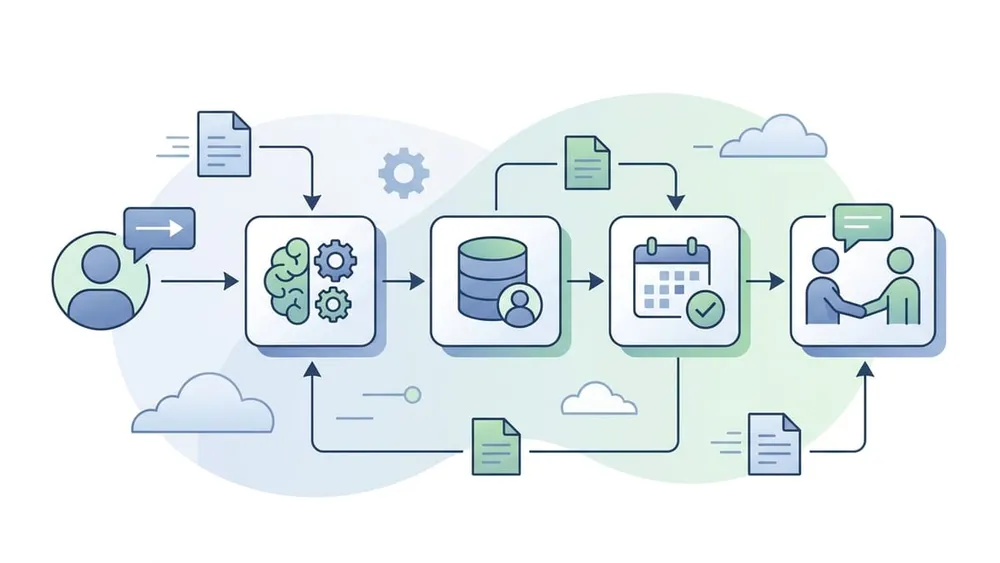
What an AI Agent Can Do on a Small Business Website
1. Answer common customer questions
The agent can answer questions about services, pricing guidance, locations, opening hours, process, timelines, booking requirements, support options, industries served, FAQs and maintenance terms. This reduces repetitive manual responses.
2. Guide visitors to the right service
Many visitors do not know exactly what they need. A visitor might say: "My website is old and I am not getting enquiries." The agent can help identify whether they need a website rebuild, SEO improvement, page speed optimisation, conversion improvement, content restructuring, accessibility fixes, CMS migration or analytics review.
3. Qualify leads
The agent can collect structured lead information before the team gets involved, including business name, website URL, industry, service required, budget range, timeline, decision-maker status, current platform, key pain points and preferred contact method.
4. Book appointments
If connected to a booking system or calendar, the agent can help users find available times and book consultations. This removes friction for customers and reduces back-and-forth emails.
5. Create support tickets
For existing customers, an AI agent can collect the issue, ask follow-up questions and create a support ticket. Useful details include issue type, screenshot or file attachment, urgency, affected page, browser, device, user role and steps to reproduce.
6. Connect to CRM systems
An AI agent becomes more powerful when connected to a CRM such as HubSpot, Salesforce, Zoho CRM, Microsoft Dynamics or a custom business system. It can create new leads, update contact records, assign enquiries, tag service interests, trigger follow-up workflows, send confirmation emails and record conversation summaries.
Microsoft describes AI agents in customer service as systems that can converse with customers, handle routine issues, collect context and hand off to human representatives with conversation history. Microsoft also describes Copilot agents as using knowledge and actions to automate business processes across connected applications.
7. Support sales follow-up
AI agents can prepare summaries for sales teams. For example: "This visitor is a small business owner in Melbourne. They need a new website, SEO support and a booking integration. Their preferred timeline is within six weeks. They asked about pricing and want a call next week." This makes follow-up more professional and less repetitive.
Best AI Agent Uses by Business Type
AI agents work best when they solve real, repeated customer or operations problems.
Service Businesses
Accountants, lawyers, consultants, web agencies, NDIS providers, trades, clinics, trainers and migration agents can answer service questions, check fit, collect enquiry details and book consultations.
Ecommerce Businesses
Agents can recommend products, answer delivery questions, explain return policies, help with sizing or compatibility and escalate order issues.
Healthcare and Care Providers
Agents can explain service categories, collect non-sensitive enquiry information and route users to booking or contact options, but must avoid medical advice unless specifically governed.
Education Providers
Training providers can explain courses, check enrolment interest, answer intake questions, guide users to forms and send leads to admissions teams.
Professional Services
Agents can qualify enquiries, explain process, prepare consultation notes, collect documents and route enquiries by service area.
Existing Client Support
Businesses with retained clients can triage support, collect cleaner tickets and send urgent issues to the right person faster.
What Your Website Needs Before Adding an AI Agent
An AI agent is only as good as the information it can use. Before adding one, your website should have clear and reliable content.
Clear service pages
Each major service should have its own page explaining what the service is, who it is for, what is included, what problems it solves, what the process looks like and what information the customer should prepare. VaniTech's small business website solutions, CMS services and SEO, schema, AEO and GEO services are examples of service areas that benefit from clear page structure.
Strong FAQs
FAQs are useful because they reflect real customer questions. Examples include: How much does a website cost? How long does a website project take? Do you provide hosting and support? Can you redesign my existing website? Can you migrate my website from WordPress? Do you work with small businesses? Can you integrate with my CRM?
Accurate business information
The agent needs accurate information about business name, contact details, service areas, opening hours, pricing guidance, booking options, policies, escalation rules and team responsibilities.
Clean content structure
Your CMS should make it easy to manage the content the agent relies on. This may include service pages, FAQ blocks, knowledge base articles, support categories, lead qualification questions, booking rules, policy pages and reusable content blocks. This is where website architecture and CMS implementation become important.
VaniTech already positions its services around high-performance websites, CMS platforms, ecommerce, AI-search visibility and cloud integrations, which makes AI agent implementation a natural extension of its existing service offering.
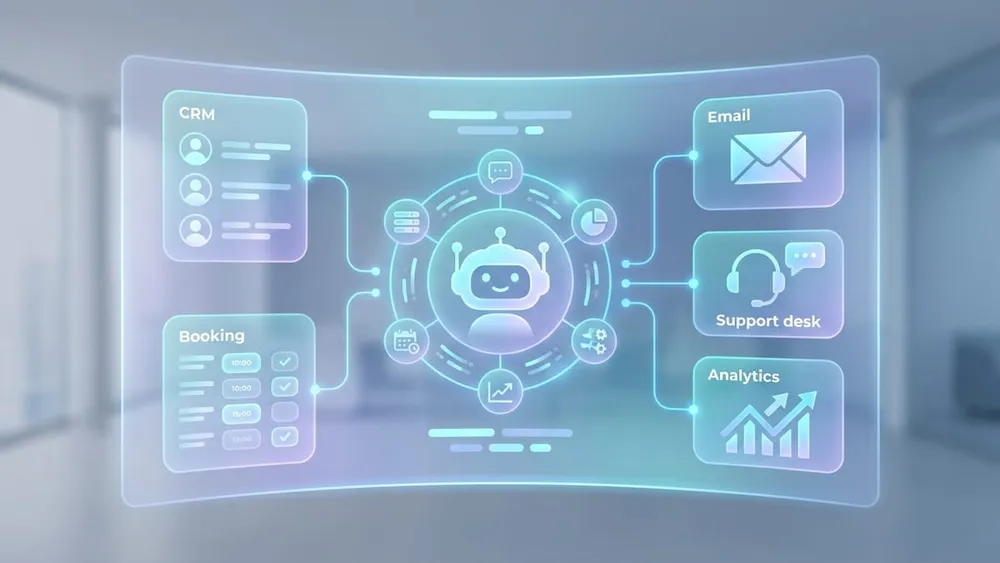
How AI Agents Connect to CRM, Booking and Support Systems
Without integration, the agent is mostly a smarter chat interface. With integration, it can become part of your business workflow.
CRM integration
The agent can create or update records in HubSpot, Salesforce, Zoho CRM, Microsoft Dynamics or custom CRM systems. Useful fields include name, email, phone, business name, website URL, service interest, lead source, budget range, timeline and conversation summary.
Booking integration
The agent can connect to tools such as Calendly, Microsoft Bookings, Google Calendar, custom booking systems or industry-specific booking tools. It can help customers choose a time and send confirmation details.
Support ticket integration
The agent can create tickets in Zendesk, Freshdesk, Jira Service Management, HubSpot Service Hub or custom helpdesk systems. This is useful for existing customers who need support.
Email and internal task integration
The agent can send structured summaries to your team and create tasks such as follow up with lead, review website URL, prepare quote, assign support request, send onboarding form or schedule discovery call. For more complex implementation, VaniTech's integration services can connect website forms, CRM systems, automation tools and backend workflows.
Privacy, Security and Trust Considerations
AI agents can be powerful, but they must be designed responsibly. Small businesses should not simply add an AI widget and let it collect anything.
The Australian Signals Directorate's Australian Cyber Security Centre has published guidance for small businesses using cloud-based AI technologies. It highlights risks such as data leaks, privacy breaches, reliability and manipulation of AI outputs, and supply chain vulnerabilities. It also warns that sensitive customer, staff or financial records can create risk if entered into AI tools without proper controls.
Before launching an AI website agent, define what the agent can collect, how the information is used, whether it is stored, whether it is shared with third-party systems and how users can contact a human.
Data collection boundaries
For many small business enquiries, it may be reasonable to collect name, email, phone, business name and general enquiry details. Be more careful with health information, financial information, identity documents, children's information, legal matters, passwords and confidential business documents.
Human handover
The agent should know when to stop and escalate. Escalation is important for complaints, urgent requests, sensitive topics, legal or medical questions, angry customers, complex pricing, high-value leads and anything outside the agent's approved scope.
Testing and access control
Not every team member should be able to change agent instructions or view sensitive conversations. Set clear permissions for agent configuration, conversation logs, CRM data, support tickets, analytics and integrations. Before launch, test whether the agent answers accurately, refuses unsafe requests, escalates correctly, captures the right information, avoids overpromising and does not invent prices, guarantees or policies.

Launch With Boundaries, Not Guesswork
A useful AI agent needs clear scope, approved content, privacy rules, data limits, human handover and regular review. The controls matter as much as the conversation design.
Common Mistakes to Avoid
- Launching an agent without clear website content: If your website content is vague, your AI agent will also be vague.
- Letting the agent answer everything: The agent should not answer legal, medical, financial or sensitive questions unless specifically designed and governed for that purpose.
- Not connecting the agent to business systems: A standalone chat window may help users, but the real business value comes from CRM, booking, email or support workflows.
- No human escalation path: Users should always have a way to contact a person.
- No monitoring: You need to review conversations and improve the agent over time.
- Poor privacy controls: Do not collect more data than needed. Do not ask customers to enter sensitive information unless there is a clear business reason and proper protection.
- Overpromising: An AI agent should not promise prices, timelines or outcomes unless those rules are approved and maintained.
How to Implement an AI Agent on Your Website
- Define the business goal. Start with one or two clear goals such as reducing repetitive enquiries, improving lead quality, increasing bookings, supporting existing customers or reducing missed after-hours opportunities.
- Map customer questions. List the questions customers already ask by phone, email, contact forms, social media, Google Business Profile, sales calls and support tickets.
- Prepare website content. Improve service pages, FAQs, pricing guidance, booking process, support process, contact page, privacy policy and terms.
- Design the agent scope. Decide what the agent can and cannot do, including what it must escalate to a human.
- Connect systems. Integrate the agent with CRM, booking, email, helpdesk, CMS, analytics or task management systems where needed.
- Add tracking and reporting. Measure conversations started, enquiries captured, bookings created, support tickets created, unanswered questions, human handovers, conversion rate and customer satisfaction.
- Test before launch. Include simple questions, unclear questions, angry messages, pricing questions, support issues, privacy-sensitive messages, competitor comparisons, urgent requests and out-of-scope questions.
- Improve continuously. Review logs, identify gaps and update FAQs, service pages, agent instructions, qualification questions, escalation rules, CRM fields and reporting dashboards.
AI Agent Features Small Businesses Should Consider
| Feature | Good for |
|---|---|
| FAQ assistant | Businesses with repeated questions |
| Lead qualification | Service businesses and agencies |
| Booking assistant | Clinics, consultants, trades and agencies |
| Support triage | Businesses with existing clients |
| Product recommendation | Ecommerce and retail |
| CRM integration | Sales-driven businesses |
| Human handover | Any customer-facing agent |
| Conversation summary | Sales and support teams |
| Multilingual support | Businesses serving diverse communities |
| Analytics dashboard | Businesses that want to improve conversion |
AI Website Agent Checklist
- The business goal is clearly defined.
- The agent's scope is documented.
- The agent has clear boundaries.
- Key service pages are accurate and updated.
- FAQs are based on real customer questions.
- Pricing guidance is approved.
- Privacy policy is updated if required.
- Users are told when they are speaking with AI.
- The agent does not collect unnecessary sensitive information.
- Human handover is available.
- CRM fields are mapped.
- Booking rules are confirmed.
- Support ticket categories are configured.
- Conversation summaries are useful for staff.
- Analytics and reporting are enabled.
- Test scenarios have been completed.
- Staff know how to review and manage conversations.
- The agent is reviewed regularly after launch.
Recommended Implementation for VaniTech
This topic fits naturally with VaniTech's existing services. VaniTech already offers website, CMS, ecommerce, cloud, integration and AI-search visibility services. Its SEO service also focuses on technical health, content architecture, schema markup, entity signals, local proof, measurement and conversion quality, which are useful foundations for AI website agents.
A future /services/ai-website-agents/ page could position the service as: "VaniTech helps small businesses turn their websites into smarter customer assistants by designing AI agents that answer questions, qualify leads, connect to CRM systems, support bookings and hand over to humans when needed."
That page should cover AI agent strategy, website content audit, FAQ and knowledge base preparation, agent conversation design, lead qualification workflow, CRM integration, booking system integration, support ticket integration, privacy and escalation rules, testing and monitoring, and monthly improvement support.
Conclusion
AI agents are becoming one of the most practical ways to make a small business website more useful. Instead of relying only on static pages and contact forms, businesses can use AI agents to answer common questions, guide customers, qualify leads, book appointments and connect website activity to CRM or support workflows.
But the technology should be implemented carefully. A successful AI website agent needs clear website content, accurate FAQs, defined business goals, privacy controls, human handover, CRM or booking integration, testing, reporting and continuous improvement.
For small businesses, the best AI agent is not the most complex one. It is the one that solves a real customer problem and fits naturally into the way the business already works. Your website should not just tell people what you do. It should help them take the next step.
AI Agents for Small Business Websites FAQs
Answers to common questions about AI website agents, lead qualification, CRM integration, safety and implementation.
Sources Checked
- Salesforce - New Research: AI Service Agents Are Scaling and Delivering CSAT
- National AI Centre - AI Adoption Insights: December 2025 to February 2026
- National AI Centre - AI Adoption Tracker
- National AI Centre - Guidance for AI Adoption: Foundations
- ASD Australian Cyber Security Centre - Artificial Intelligence for Small Business
- Microsoft Learn - Overview of AI Agents and Copilot Features
- Microsoft Learn - Agents for Microsoft 365 Copilot
Want Your Website to Do More Than Collect Form Submissions?
VaniTech can help you design an AI website agent that answers questions, qualifies leads and connects directly to your business systems.