
Multisite and Multibrand CMS Architecture
A practical guide to multisite and multibrand CMS architecture, comparing shared-platform, separate-workspace, federated, and hybrid models across Hygraph, Umbraco, Optimizely, Contentful, and Contentstack.
A multisite or multibrand CMS sounds simple: one platform, many websites. In practice, the hard question is where to share and where to separate. Share too much, and every brand becomes trapped by the slowest team. Separate too much, and the business pays for duplicate content models, duplicate integrations, duplicate governance, and duplicate migrations.
The right architecture depends on how similar the brands really are. A portfolio of regional websites with the same page types, design system, language strategy, and approval workflow can often live in one shared structure. A group with different brands, legal requirements, commerce models, content teams, and release schedules may need separate workspaces with shared foundations.
Vendor documentation was checked on 13 May 2026. This article focuses on architecture and implementation fit across Hygraph, Umbraco, Optimizely, Contentful, and Contentstack. Product limits, plan availability, and enterprise features can change, so confirm final details during procurement.
The Four Architecture Patterns
Most multisite CMS builds are variations of these four patterns. The safest choice is the one that matches governance reality, not only launch speed.
One CMS, Many Site Roots
Best when sites share the same platform, content schema, editor workflow, hosting model, and release cadence. Umbraco and Optimizely both document this style clearly.
One Workspace, Site-aware Content
Best when a headless CMS stores shared content plus site-specific entries using locales, market fields, references, taxonomies, and delivery rules.
Many Workspaces, Shared Standards
Best when brands need isolation but the organisation still wants shared content model templates, reusable components, design systems, governance, and migration discipline.
Federated Content Platform
Best when brand websites must combine CMS content with product, commerce, DAM, PIM, search, pricing, availability, or legacy data without copying every source into the CMS.
What Multisite and Multibrand Actually Mean
Multisite usually means one organisation manages multiple websites under a common technical framework. The sites may be regional, language-specific, campaign-specific, product-specific, or audience-specific. Multibrand means the platform must support distinct brand identities, tone of voice, design rules, ownership, approvals, analytics, and sometimes separate legal or compliance requirements.
The difference matters. A multisite network can often reuse page types, navigation patterns, media rules, SEO fields, and release workflows. A multibrand platform may need stronger separation: different design tokens, different component availability, different content permissions, different analytics destinations, different consent rules, and different integrations.
The Decision Matrix
| Architecture | Best for | CMS features that matter | Main risk |
|---|---|---|---|
| Single instance with multiple roots | Related sites with shared code, shared database, similar page models, and central governance. | Root nodes, hostnames, language routing, shared media, reusable blocks, permissions, and deployment discipline. | One platform issue, schema change, or workflow bottleneck can affect every site. |
| Single headless workspace with site fields | Brands or markets that share a content model but need targeted entries, locales, and publishing destinations. | References, locales, environments, API filtering, roles, workflows, and preview by site or market. | Content queries and editor screens can become messy if the site model is vague. |
| Separate spaces, stacks, or projects | Brands with different teams, content models, release cycles, legal needs, or billing ownership. | Organisation-level governance, templates, reusable schema, cross-space references, stack roles, and migration tooling. | Duplication grows unless shared standards are actively maintained. |
| Federated content architecture | Businesses where web experiences combine CMS content with product data, commerce, DAM, PIM, CRM, or legacy systems. | Remote sources, content federation, APIs, shared identifiers, caching, preview, and error handling. | The CMS can become an orchestration layer without clear ownership of source-of-truth data. |
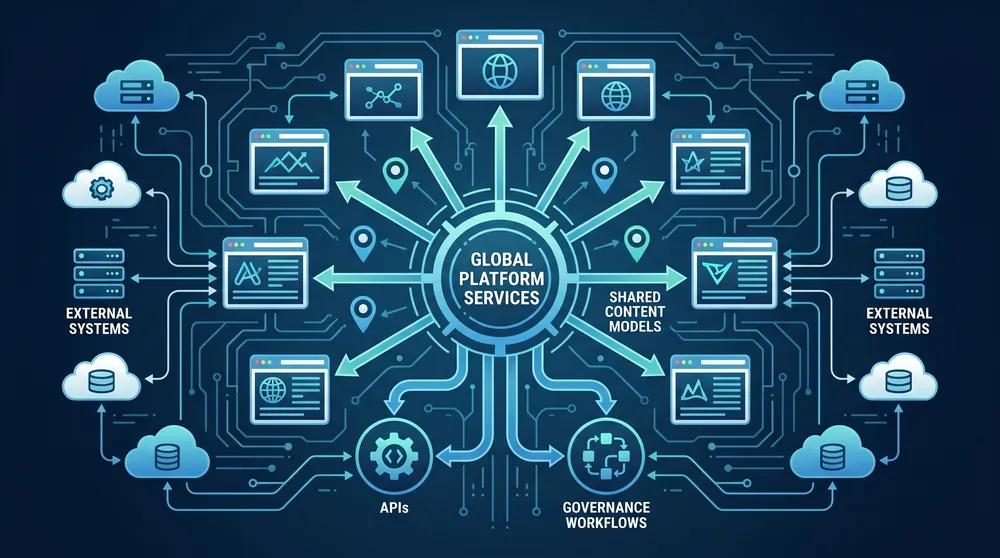
Share the Platform, Not Every Decision
The strongest multisite CMS platforms define what is global, what is brand-specific, what is market-specific, and what should stay in another system entirely.
What to Design Before Implementation
These decisions prevent multisite CMS builds from turning into a duplicate-content factory or a fragile shared monolith.
Site Boundaries
Define whether each site is a root node, space, stack, project, locale, environment, channel, or filtered content collection.
Brand Rules
Map design tokens, component availability, tone of voice, disclaimers, metadata, accessibility standards, and approval ownership.
Shared Content
Decide which content can be reused globally, localized, overridden by brand, or kept entirely separate for legal or commercial reasons.
Localization
Plan locales, fallback rules, translation workflows, URL structure, regional SEO, and who can publish each language or market.
Permissions
Set roles by organisation, brand, site, environment, branch, locale, content type, workflow stage, and publish destination.
Release Model
Separate content publishing from schema changes, front-end deployments, integration releases, redirects, analytics, and rollback plans.
How the Major CMS Options Approach It
| CMS | Useful architecture primitives | Strong fit | Watch-outs |
|---|---|---|---|
| Umbraco | Multiple root nodes, culture and hostname mapping, document types, element types, data types, reusable compositions, shared media, .NET hosting, and Umbraco Cloud Baselines. | Multiple related websites where teams want an editor-friendly CMS, strong .NET implementation control, and a shared content schema. | Umbraco documents that a single-project multisite setup shares one database and schema, can increase resource usage, can affect editor workflows, and can limit schema-change flexibility. On Umbraco Cloud, Baselines are recommended for greater stability. |
| Optimizely CMS | Multi-site setup in one running instance, shared database and file structure, shared media and blocks, content types, pages, blocks, languages, access controls, Content Delivery API, and CMS SaaS Visual Builder patterns. | Enterprise websites that need mature editorial workflows, reusable blocks, multi-language content, experimentation or personalization adjacency, and .NET or Optimizely platform integration. | A multi-site setup can centralize governance, but it also couples sites through the same platform, database, codebase, and release process. Model site-specific ownership carefully. |
| Contentful | Organizations, spaces, environments, locales, space roles, teams, content model templates, cross-space references, structured content, Studio, Personalization, and broad API delivery. | Composable multibrand programs where content models, reusable structured content, localization, and multiple digital channels matter more than page-tree CMS conventions. | Contentful guidance often favours keeping content in one space unless there is a real reason to separate. Multiple spaces help isolation, but increase governance, licensing, reference, and model-management complexity. |
| Contentstack | Organizations, stacks, branches, environments, languages, fallback languages, stack roles, global fields, publish rules, workflows, Visual Builder, Automate, Personalize, and composable DXP services. | Enterprise teams that need stack-level governance, reusable global fields, branch-based model work, controlled publishing across environments and locales, and broader DXP orchestration. | Global fields are stack-specific, so cross-stack consistency needs process and tooling. Stack boundaries are powerful, but every extra stack must be justified by governance, brand, compliance, or release needs. |
| Hygraph | GraphQL-native content APIs, environments, locales, content stages, roles and permissions, components, references, Remote Sources, and Content Federation through one GraphQL endpoint. | GraphQL-first architectures where multiple sites or brands need structured content plus external data from commerce, PIM, DAM, legacy services, or other APIs. | Hygraph environments are for schema change and testing, not editorial workflow. Multisite strategy needs a clear project, model, locale, stage, and permission design before content scales. |
Platform Notes
Umbraco: practical when sites share schema
Umbraco's multisite tutorial recommends multiple root nodes in the Content section, with each root node acting as a separate website. Hostnames are mapped to the relevant root node through Culture and Hostnames. This is clean when sites share schema and code, but it is less ideal when brands need separate release cycles, separate content models, or strong operational isolation.
Optimizely: strong for enterprise multi-site governance
Optimizely CMS documents multi-site hosting as a multi-tenant setup where a single running CMS instance can host multiple websites that share the same file structure and database. It also supports reusable blocks, multi-language management, and headless delivery through the Content Delivery API, making it a strong fit for centrally governed enterprise portfolios.
Contentful: model the organisation before the spaces
Contentful spaces contain their own content model, content, assets, memberships, and API keys. Environments allow isolated versions of content and configuration inside a space. Locales are managed at environment level. Cross-space references and content model templates help with reuse, but the main architectural decision is still whether brands should share one space or operate in separate spaces with shared standards.
Contentstack: stacks, branches, global fields, and publish control
Contentstack treats a stack as the central repository for a site or project. Branches let teams work from copies of stack content and schema without affecting the parent branch. Global fields reduce repeated schema work inside a stack, languages support localization, and publish rules can enforce controls across branches, environments, content types, and locales.
Hygraph: federation is the differentiator
Hygraph is strongest when the CMS should not become the dumping ground for every source system. Remote Sources allow content from REST or GraphQL services to appear through Hygraph's API without migrating the source data. For multibrand platforms with product, pricing, availability, reviews, locations, or legacy content, that federation model can be more sustainable than copying data into each brand site.

The Core Architecture Decisions
1. Shared schema or separate schema?
If every brand uses the same page types, components, SEO fields, media rules, and navigation structure, a shared schema reduces maintenance. If brands need different page models, legal fields, data integrations, or release timing, separate workspaces or separate site roots may be safer.
2. Shared content or duplicated content?
Shared content is useful for legal statements, corporate boilerplate, product facts, author profiles, locations, knowledge base articles, and campaign assets. Brand content should be overrideable where tone, compliance, offer, market, or audience differs. The model should make the override rules obvious to editors.
3. Locale or site?
A locale is not always a site. Australian English, New Zealand English, and US English might be localized versions of similar content, or they might be separate websites with different products, pricing, compliance, redirects, and analytics. Treating every site as a locale can become painful when market operations diverge.
4. Environment, branch, or workflow stage?
Do not use environments as a substitute for editorial approval unless the vendor explicitly supports that pattern. In many CMSs, environments and branches are better for schema and release work, while workflows, stages, roles, and publish rules are better for content governance.
5. One front end or many?
A shared CMS does not require one front end. You can have one front-end application with brand theming, several front ends reading the same CMS, or a hybrid setup where high-value brands get dedicated applications. The deciding factors are design divergence, performance needs, team ownership, and deployment risk.
Recommended Pattern by Situation
| Situation | Recommended architecture | Likely CMS fit |
|---|---|---|
| Regional versions of the same website | Single CMS structure with locales, market fields, fallback rules, and site-aware publishing. | Contentful, Contentstack, Hygraph, Optimizely, or Umbraco depending on stack preference. |
| Several related brands with the same component library | Shared content model plus brand-level settings, brand tokens, permissions, and override rules. | Contentful, Contentstack, Optimizely, Hygraph, or Umbraco with strong implementation discipline. |
| Independent brands under one parent company | Separate spaces, stacks, projects, or instances with shared templates, shared design system, and central governance. | Contentful spaces, Contentstack stacks, Hygraph projects, Umbraco Cloud Baselines, or separate Optimizely implementations. |
| Content-heavy portfolio with shared legal and knowledge content | Central shared content library referenced by site-specific content models. | Contentful cross-space references, Contentstack references and global fields, Hygraph references or federation, Optimizely shared blocks, Umbraco reusable content structures. |
| Commerce, product, or inventory-led sites | Federated model that keeps product, pricing, stock, and customer data in source systems. | Hygraph for GraphQL federation, or Contentful/Contentstack/Optimizely with composable integrations and careful API design. |
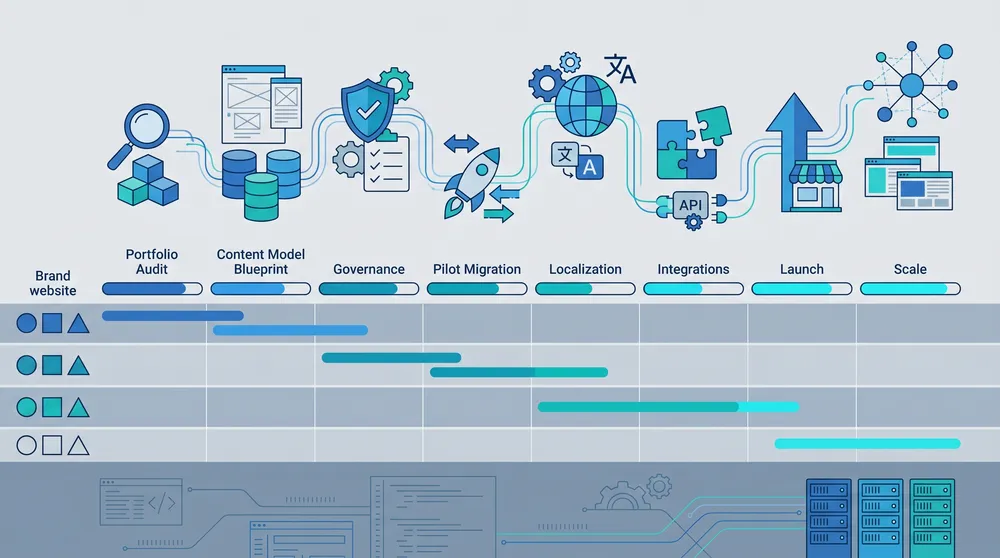
Build the Shared Foundation First
A good multisite rollout starts with shared primitives: content model, design system, roles, localization rules, preview, analytics, redirects, and source-of-truth ownership.
A Practical Rollout Plan
Phase 1: Portfolio audit
List every brand, site, locale, content team, domain, analytics property, integration, design system, legal requirement, approval path, and content repository. Group sites by similarity before choosing architecture.
Phase 2: Content model blueprint
Define global content types, site-specific types, reusable blocks, taxonomies, SEO fields, navigation models, settings content, redirects, forms, assets, and ownership metadata. Decide which fields are localizable, brand-specific, or inherited.
Phase 3: Governance and permissions
Create roles around real operating boundaries: brand, market, locale, content type, environment, branch, workflow stage, and publishing destination. Add audit, preview, rollback, and scheduled-publishing expectations before migration begins.
Phase 4: Pilot one shared and one edge case site
Do not pilot only the easiest website. Pick one normal site and one awkward site with localization, brand exceptions, product integrations, or special approvals. The pilot should prove that the model can handle real variation.
Phase 5: Migration factory
Move content in waves. Clean duplicates, map redirects, validate metadata, preserve canonical URLs where required, and test search, forms, analytics, consent, and performance for each site before launch.
Common Mistakes
- Choosing one shared CMS instance because it looks cheaper before modelling governance and release risk.
- Creating a separate workspace for every brand without reusable content model standards.
- Treating locales, countries, markets, and websites as the same concept.
- Letting brand overrides become hidden exceptions inside rich text fields.
- Using environments or branches as editorial workflow when approvals belong in workflow, roles, or publish rules.
- Copying product, pricing, availability, or legal data into the CMS when another system is the true source.
- Forgetting that previews, redirects, analytics, search indexing, and consent rules also need multisite design.
Final Recommendation
Use one CMS instance or workspace when sites genuinely share a schema, governance model, team structure, and release cadence. Use separate workspaces or instances when brand autonomy, compliance, team ownership, or operational isolation matters more than centralization. Use federation when the experience depends on data that should stay in specialist systems.
For Australian businesses planning a multisite or multibrand rebuild, the safest first deliverable is not a vendor shortlist. It is a content and governance blueprint that shows exactly what is shared, what is local, what is brand-owned, what is inherited, and what comes from another platform. Once that map is clear, the CMS decision becomes much less political and much more architectural.
Sources Checked
- Umbraco multisite setup
- Umbraco document types and element types
- Optimizely CMS multiple sites
- Optimizely shared and inline blocks
- Optimizely headless multi-channel content
- Contentful spaces and organizations
- Contentful environments
- Contentful localization
- Contentful cross-space references
- Contentstack stacks
- Contentstack branches
- Contentstack global fields
- Contentstack languages
- Hygraph overview
- Hygraph Remote Sources
- Hygraph localization
- Hygraph environments